Data Fabric
One shared set of business data for every Commergenix module.
Data Fabric is the data layer underneath the modules. One module publishes a named, described feed, such as machine status or ecommerce sales, and other modules use it without being wired directly to the module that owns it.
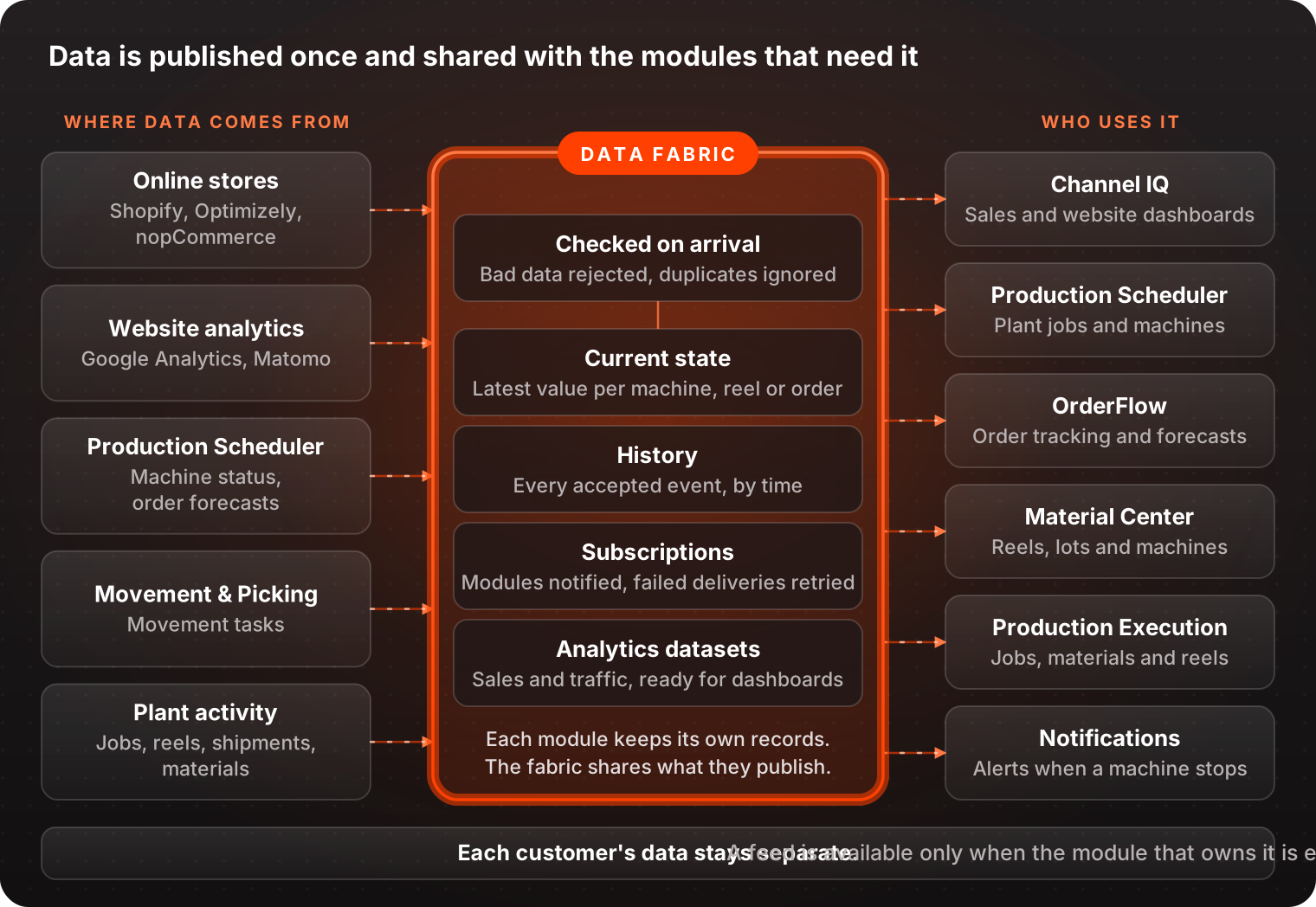
A described feed, not a private connection.
Every feed says what it is, who owns it and what its data looks like, so a module can use it without knowing how the owning module works.
Order forecast, per order line
published by: Production Scheduler
used by: OrderFlow
includes: predicted finish, range,
          confidence, risk
- Checked
- Events that don’t match the feed’s format are rejected
- Current state
- The latest forecast for each order line
- History
- Every accepted event, readable by time range
Published only when the forecast actually changes, so OrderFlow isn’t handed the same answer again.
Every new connection makes the next one harder.
-
Connections multiply
Without a shared layer, each module needs its own connection to every other module and source.
-
Copies disagree
Each one keeps its own copy of “what’s the current status?”, and the answers drift apart.
-
History goes missing
When a system only stores the latest value, nobody can see what changed or when.
Publish once, use it wherever it’s needed.
-
Describe
Each feed has a name, a description, an owner, a version and typed fields: text, numbers, true or false, dates and fixed lists of values.
-
Check
A missing required field, a wrong type, a value not on the list or an unknown field is rejected on the way in.
-
Keep
Each machine, reel or order line has a current value, and every accepted event goes into history. A late, older event never overwrites newer state.
-
Deliver
Modules can react when an event arrives. Failed deliveries are retried automatically, up to six attempts, and then marked failed so an operator can retry them.
You see it inside the modules.
Data Fabric has no screen or switch of its own. A feed is available when the module that owns it is enabled, and the results show up in the modules you already use.
Channel IQ
Dashboards and Explore run on sales from Optimizely Configured Commerce, Shopify and nopCommerce, and web data from Matomo and Google Analytics, refreshed on a schedule.
Learn more →Production Scheduler
Machine status colors the schedule board and fills the recent changes on each machine’s page. A machine going Down or Blocked raises an in-app alert.
Learn more →OrderFlow
Order tracking uses plant operations feeds, and each order line gets a predicted finish with its range, confidence and risk.
Learn more →Material Center
Reads plant operations feeds such as material lots and consumption.
Learn more →Production Execution
Reads the same plant operations feeds as the rest of the production modules.
Learn more →Movement & Picking
Publishes movement tasks, with their history, to Data Fabric.
Learn more →Clear rules for shared data.
Each customer’s data kept separate
Every read and write is limited to one customer, and access is checked again at delivery. Reads across customers return nothing, and writes across customers are refused.
The owner stays the owner
The module that owns the data remains its source. Data Fabric holds a shared view of it for other modules to use.
Repeats are ignored
An event that arrives twice with the same ID only counts once, and pending deliveries carry on after a restart.
Numbers that say how fresh they are
Sales and website data are fetched again to pick up revised numbers, and the last refresh and coverage are tracked.
Common questions
Do I buy Data Fabric separately?
No. It’s part of the shared platform that the modules run on, and a feed is available when the module that owns it is enabled.
Can our other systems read from it?
Not today. Data comes in from connected systems and moves between Commergenix modules, but outside systems can’t read or subscribe to a feed.
Does it connect directly to our machines?
No. There’s no direct shop-floor connection today. Machine status is set on the machine’s page in Production Scheduler or through the Scheduler’s API.
How current is the data?
Module events are picked up when they’re published, with a check every 15 seconds as a backstop. Sales and website data refresh on a schedule, hourly or nightly, and aren’t live to the second.
What happens if a delivery fails?
It’s retried automatically after 30 seconds, 2 minutes and 8 minutes, up to six attempts. After that it’s marked failed and an operator can retry it.
Who can see our data?
Your company’s modules and users see your data only. Platform operators have a console for running the service, which can see across customers.
Tell us which modules you’re looking at.
We’ll walk through the data they share, where it comes from, and what your team would see.