Movement & Picking
Every reel to the right place, scanned at both ends.
Movement & Picking tells your material handlers what needs to move, where to pick it up, where it goes and how soon, on any phone or scanner. Every pickup and delivery is verified by scan, and Material Center knows where the reel is the moment it’s confirmed.
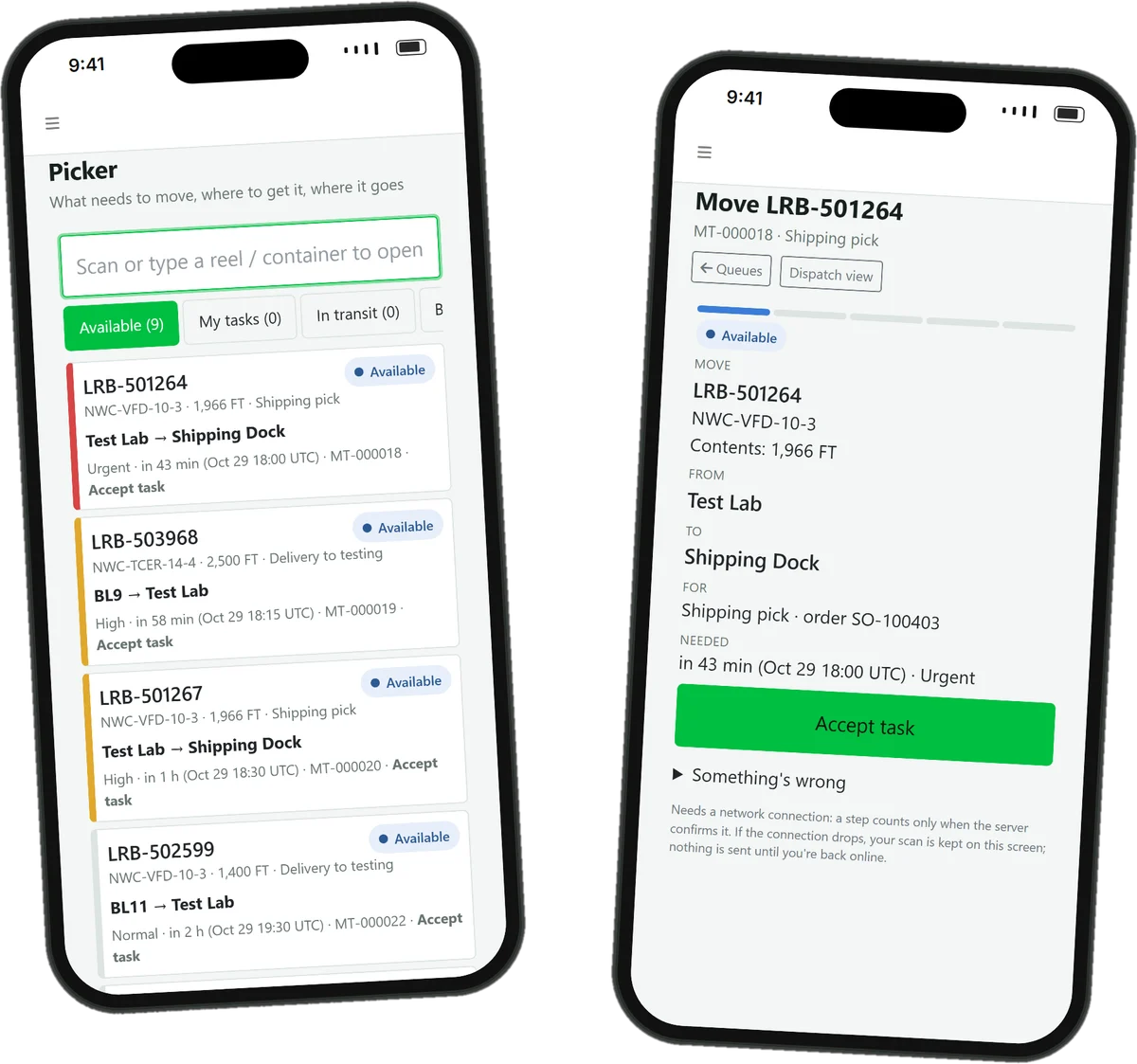
A move counts when both scans say so.
Shipping asks for a reel. Nothing is recorded as delivered until the right reel has been scanned at the right place.
“LRB-501264, 1,966 ft of NWC-VFD-10-3, from the Test Lab to the Shipping Dock for order SO-100403. Urgent.”
- A handler accepts the task; nobody else can take it.
- They scan the reel: the wrong reel is refused.
- They scan the Shipping Dock: the wrong place is refused.
- Material Center records the reel at the dock.
And if quality hasn’t released that reel, it can’t be delivered to shipping at all, not even with an override.
Moves happen on the radio. Nobody writes them down.
-
The wrong reel goes
Two reels of the same cable sit side by side. One passed test and one didn’t, and the forklift takes whichever is closer.
-
Reels go missing in between
It left the line and never reached the test lab. Where it is depends on who you ask.
-
Urgent gets lost
The truck leaves at three, but the shipping pick is fourth in line behind three routine transfers.
From request to confirmed delivery.
-
From anywhere
The Production Scheduler, OrderFlow or a dispatcher asks for a move, with a purpose, a priority and a needed-by time.
-
One person has it
A handler accepts the task, or a dispatcher assigns it. Two people can’t claim the same move.
-
Scan the reel
The item scan, and the source scan where your policy needs one, prove it’s the right unit.
-
Scan the place
A scan of the destination confirms it arrived where it was meant to go.
-
Material Center knows
The new location is recorded on the reel, with the move on its history.
Every move by priority and due time.
Dispatchers see all open work: overdue, blocked, in transit, unassigned, and any move Material Center hasn’t confirmed yet. Assign or reassign, change priorities, group by purpose, assignee, destination or job, and resolve what’s stuck.
- Exceptions with a way out: retry, reassign, approve an alternate destination, return it to its source, or cancel before pickup.
- Custody kept: after pickup, a reassignment is a handover, and who picked it up stays on record.
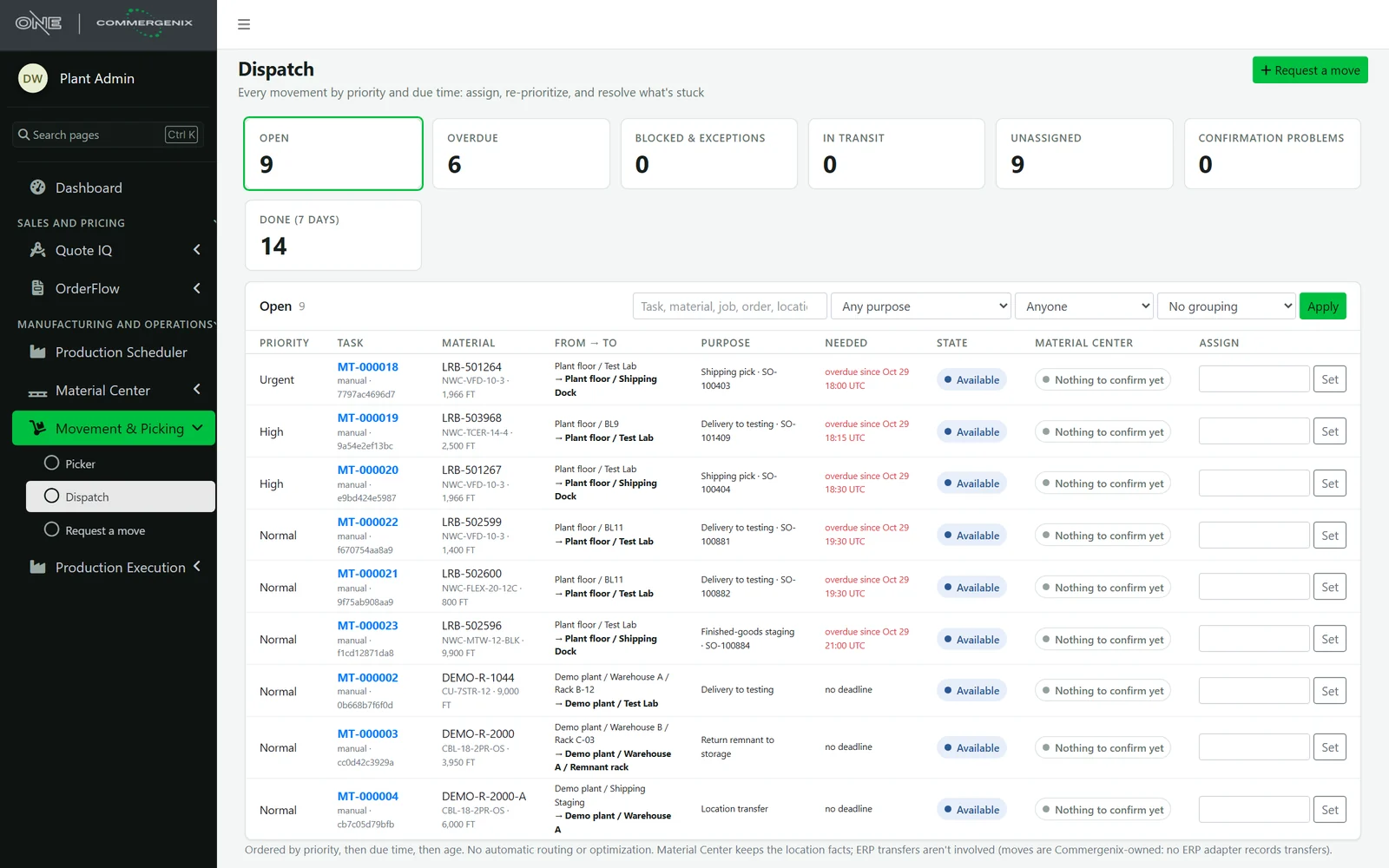
The wrong reel gets refused, not delivered.
Handlers scan with a keyboard-wedge scanner, type the identifier, or use the phone’s camera where the browser supports it. A scan is resolved within your company only. Scan a container and it resolves to what’s on it now; if that’s not the task’s reel, the scan is refused.
- Clear messages: wrong item, wrong destination, unknown, ambiguous, empty container or stale contents.
- Every rejected scan recorded, so you can see where the floor gets it wrong.
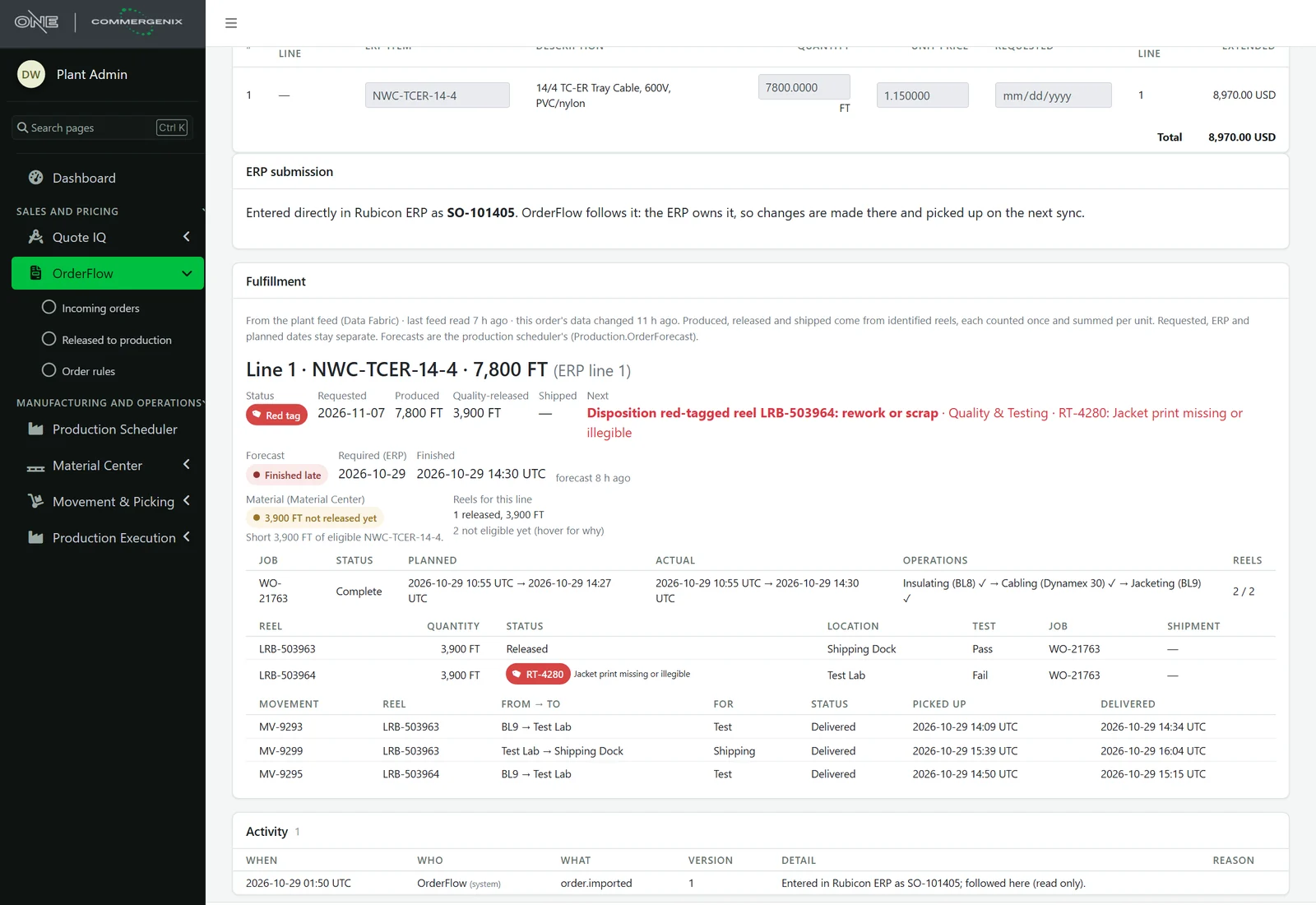
A move is a move, and nothing more.
Quality comes first
Material that isn’t quality-released never goes to shipping. A held reel can go to testing; anywhere else is a warning.
It never changes the material
A move doesn’t cut, consume, release a hold, change a reservation or ship anything.
One move per reel
A reel can only be in one active move at a time, across every module that asks.
Nothing vanishes in transit
After pickup, a problem keeps the task in transit with the exception open, so the reel’s whereabouts are never lost.
Counted once
Every step carries its own id, so a resubmission after a dropped connection applies once.
A full audit
Every claim, scan, pickup, delivery and exception is recorded with who, when and why.
For the people who move the material.
Material handlers
A queue on the device in their hand: what to move, from where, to where, and how soon.
Dispatchers and supervisors
Every open move in one place, with what’s late, stuck or unassigned.
Quality and shipping
Only released reels reach the dock, and every one gets there by scan.
Common questions
What devices does it need?
Any phone, tablet or scanner device with a browser. Keyboard-wedge scanners and typing work everywhere; camera scanning appears where the browser supports it.
Does it work offline?
No. A step counts only when the server confirms it. If the connection drops, the scan stays on the screen and nothing is sent until the device is back online.
Does it route or optimize the moves?
No. Moves are ordered by priority, then due time, then age, and dispatchers assign them. There’s no automatic routing.
Does it update my ERP?
No. Moves are recorded in Commergenix through Material Center, which keeps the location facts. No ERP transfer is posted.
Who can ask for a move?
The Production Scheduler and OrderFlow can request moves for a job’s or an order’s material, and dispatchers can request one by hand. Asking again for the same thing returns the same request.
Works alongside
Every Commergenix module shares one sign-in, one job engine, and one set of integrations, so each one you add makes the others more useful.
Material Center
Every reel, spool, lot and remnant tracked as a physical unit: where it is, how much is left, its quality status and the job it’s for.
Learn more →Production Scheduler
Your schedule beside a predicted finish for every order, learned from how your machines actually run.
Learn more →OrderFlow
Won quotes become checked, approved ERP orders, and every open order is followed through the plant until it ships.
Learn more →Put the queue in their hands.
See your own reels, locations and shipping picks on a phone, with every move verified by scan.