Production Execution
Know which lot went into every reel.
Production Execution puts a terminal at each machine showing what’s running, what’s next and the material it needs. Operators scan the lots they load. When those scans and the plant system disagree, it opens a discrepancy and says how to fix it. When the job is done, each reel’s genealogy is recorded.
The plant system reports the work. Operators confirm the lots.
When the two disagree, you find out while the job is still fresh, not when a customer asks what’s in a reel.
- Job
- WO-20503 · Insulating on BL8
- Material
- CU-10AWG copper, 567.4 lb
- Lots used
- RM-100053 · 310.8 lb
RM-100058 · 256.6 lb
- At the machine
- RM-100053 · 567.4 lb
- Result
- Lot mismatch opened
The two records name different lots. Production Execution flags it and says what to do: check which lot was loaded, then correct the plant system or withdraw the scan. The discrepancy closes by itself once the records agree.
When a customer asks what’s in a reel, you should have the answer.
-
Consumption is assumed
The plant system backflushes the lot it expects you used. Whether that’s the lot on the payoff is anyone’s guess.
-
Mistakes surface at the customer
A wrong compound or an on-hold lot gets loaded, and nobody knows until a reel fails or a claim comes in.
-
Traceability by detective work
Tracing a reel back to its copper and compound lots means paper travelers, spreadsheets and a lot of asking around.
From the machine terminal to the reel’s genealogy.
-
A terminal per machine
What’s running, what’s next, and the material each operation needs, read from your plant system.
-
Scan what you load
The operator scans the lot or container. The scan is checked against the material list and Material Center before it counts.
-
Two records, side by side
The plant’s consumption report and the floor’s scans are compared after every scan and every five minutes.
-
Fix what disagrees
A discrepancy names the job, the lots and what to check. It closes by itself when the records agree.
-
Genealogy, recorded
The lots that went in and the reels that came out are recorded in Material Center, so each reel shows what it was made from.
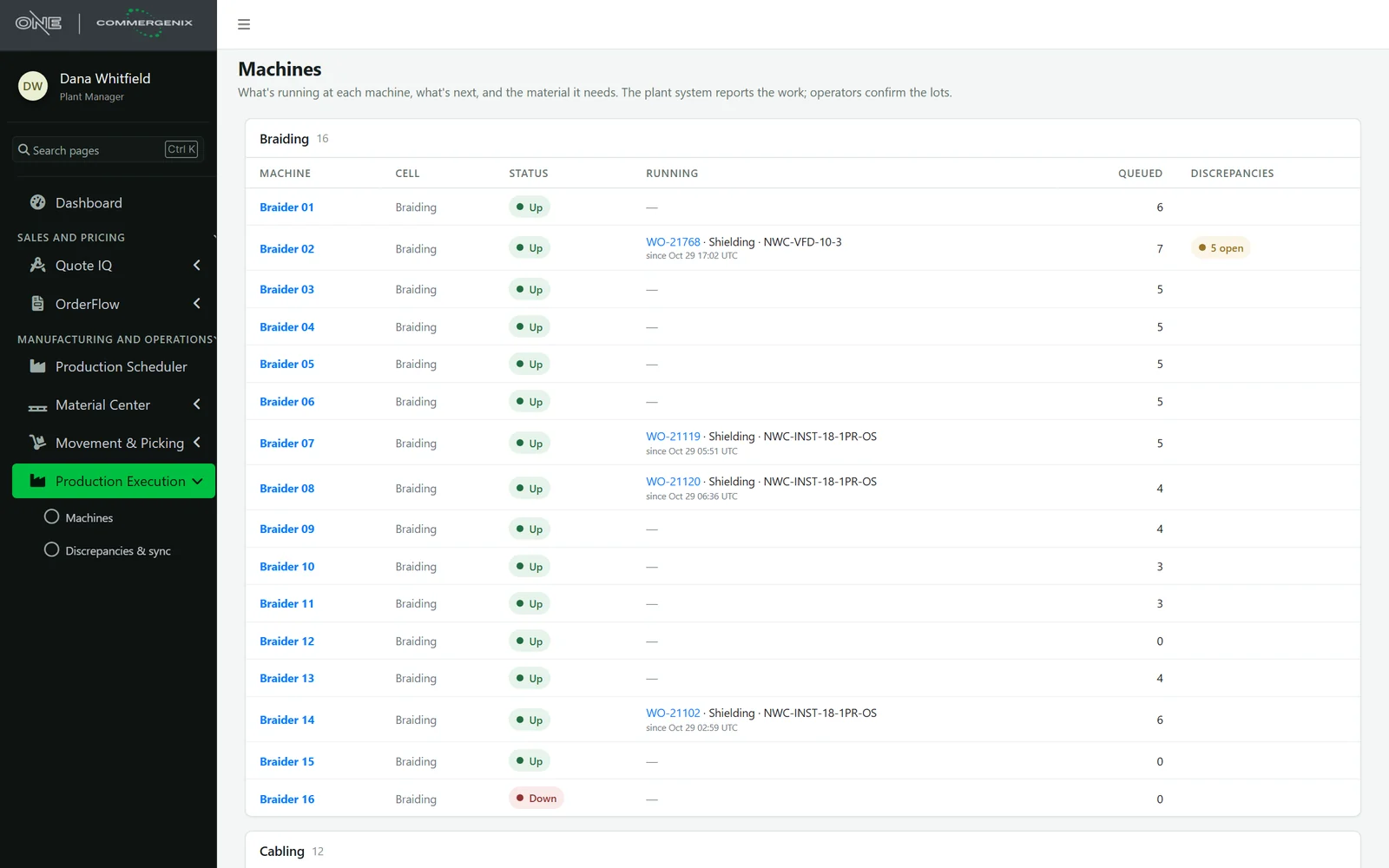
Every machine, what it’s running, and what needs a look.
All your machines grouped by process (braiding, cabling, extrusion, rewinding, testing), each with its cell, status, the job running now, how many operations are queued, and any open discrepancies.
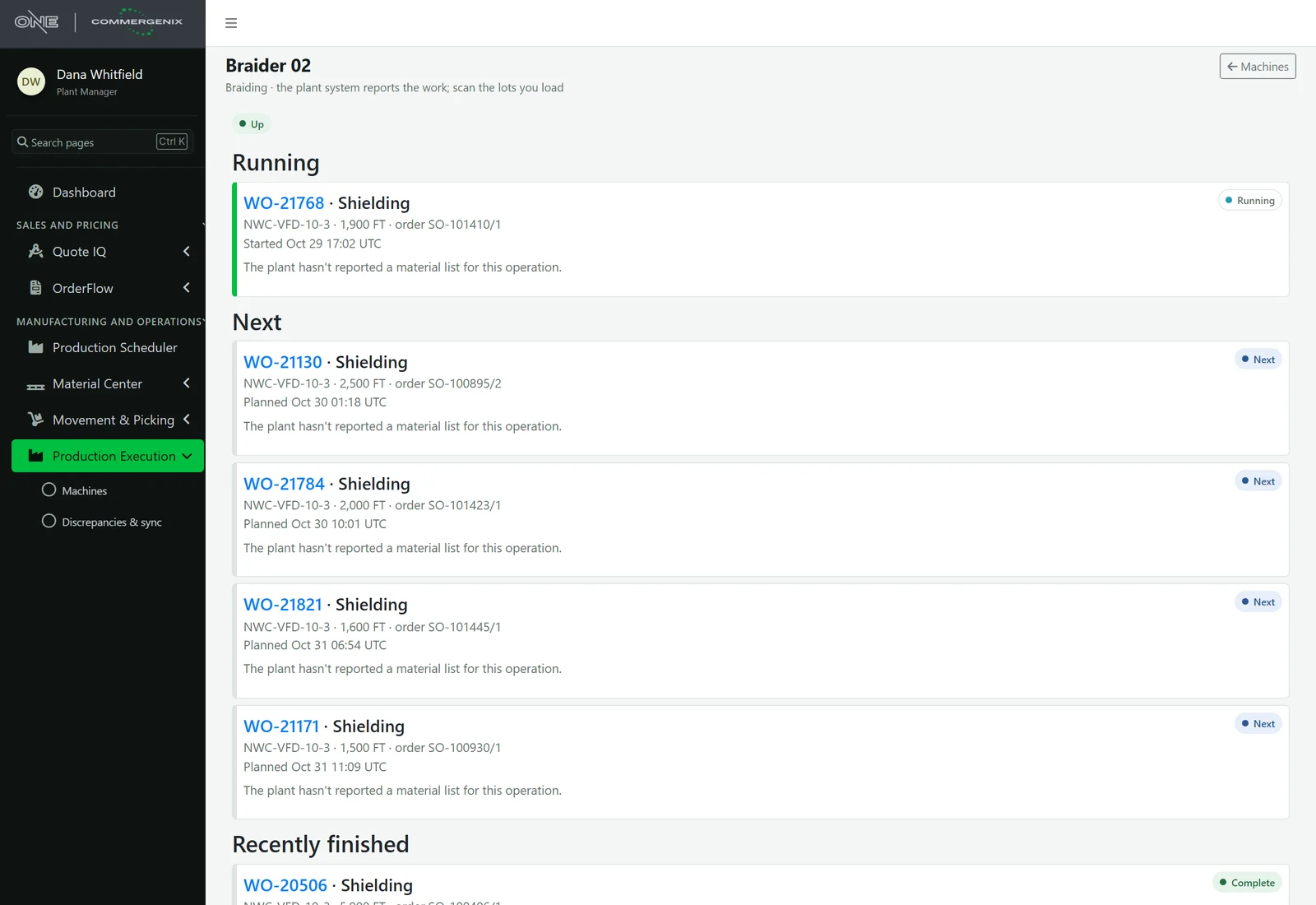
What’s running, what’s next, what it needs.
Each machine’s terminal shows the operation running now, the ones coming next and recently finished work, each with its product, footage, order and planned time. Where the plant reports a material list, the operation shows what it needs and a box to scan the lots you load.
- Scans that are checked: a lot that isn’t on the material list, isn’t quality-released, or has left the plant is refused, with the reason given.
- No double counts: a resubmitted scan from a dropped connection or a double tap records once.
- Honest offline: without a connection nothing is sent, and the scan stays on screen until it can be.
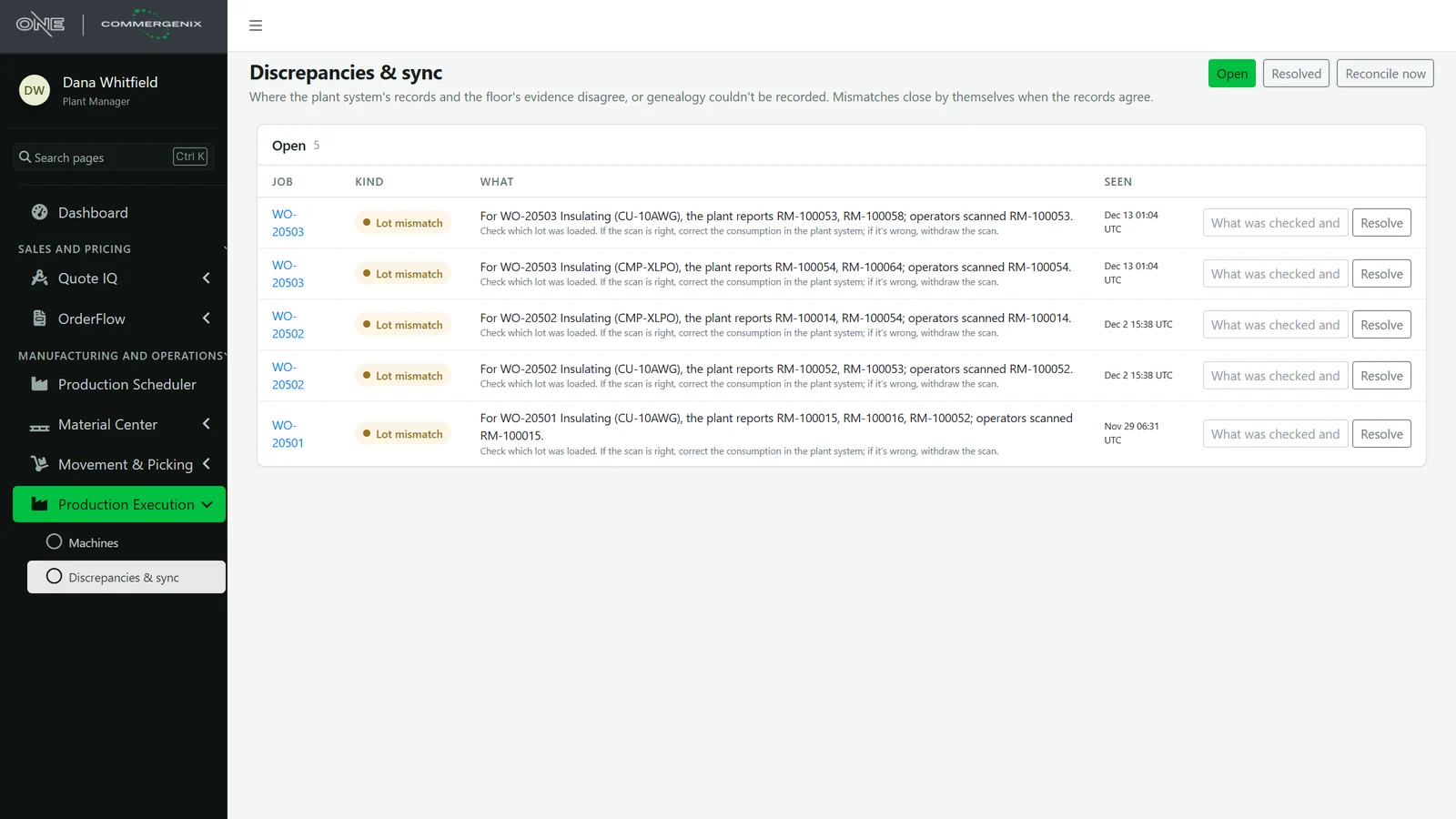
Disagreements found, and how to fix them.
When the plant’s records and the floor’s evidence disagree, or genealogy can’t be recorded, a discrepancy opens. Each one says what was found and what to check. A lot mismatch closes by itself when the records agree, or a supervisor resolves it with a note on what was checked.
- Reconciled continuously: after every scan or withdrawal, every five minutes, or on demand.
- Nothing quietly changed: Production Execution never edits a plant quantity. The plant system is corrected, or the scan is withdrawn, with a reason that stays on the record.
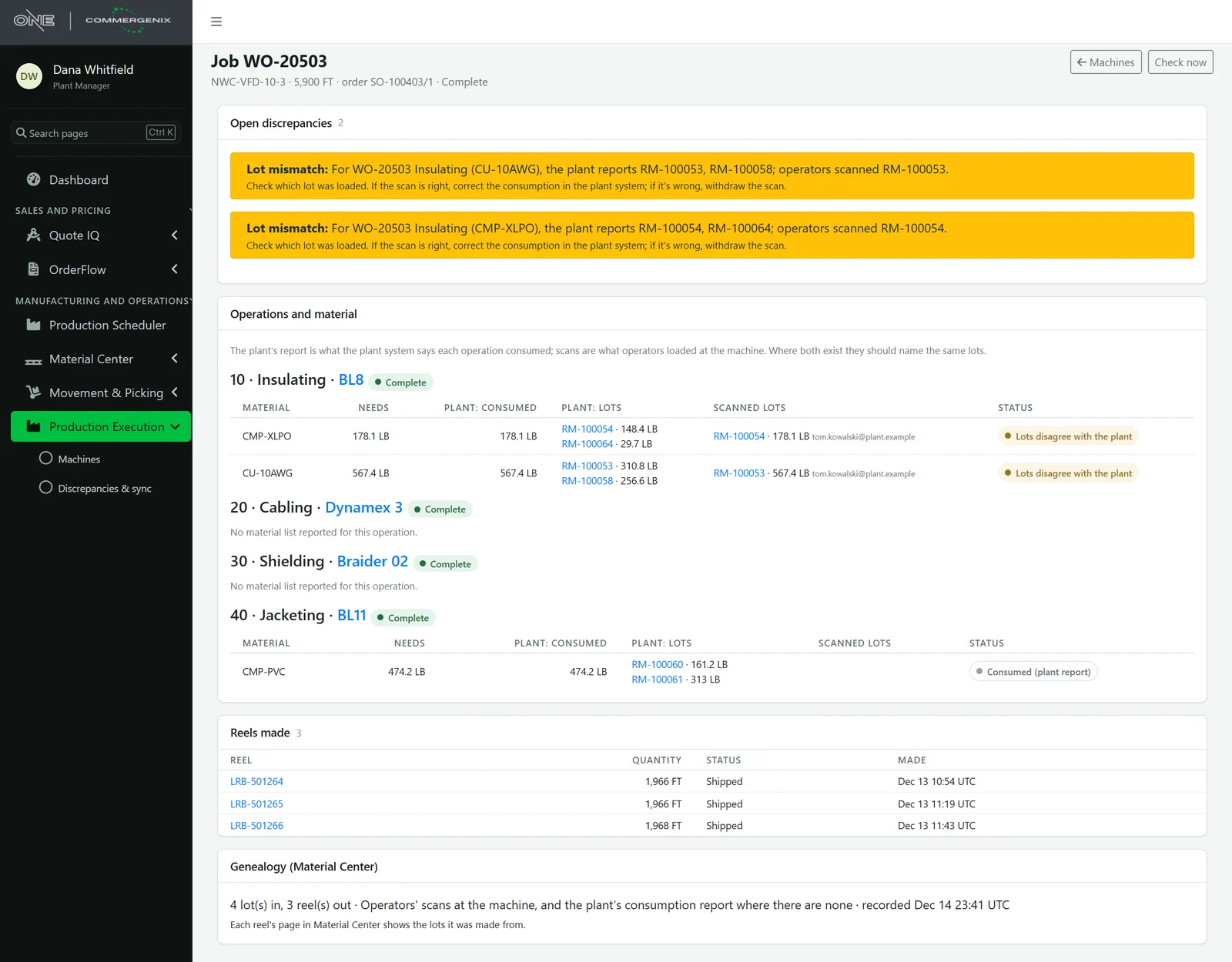
Every job, from its operations to its reels.
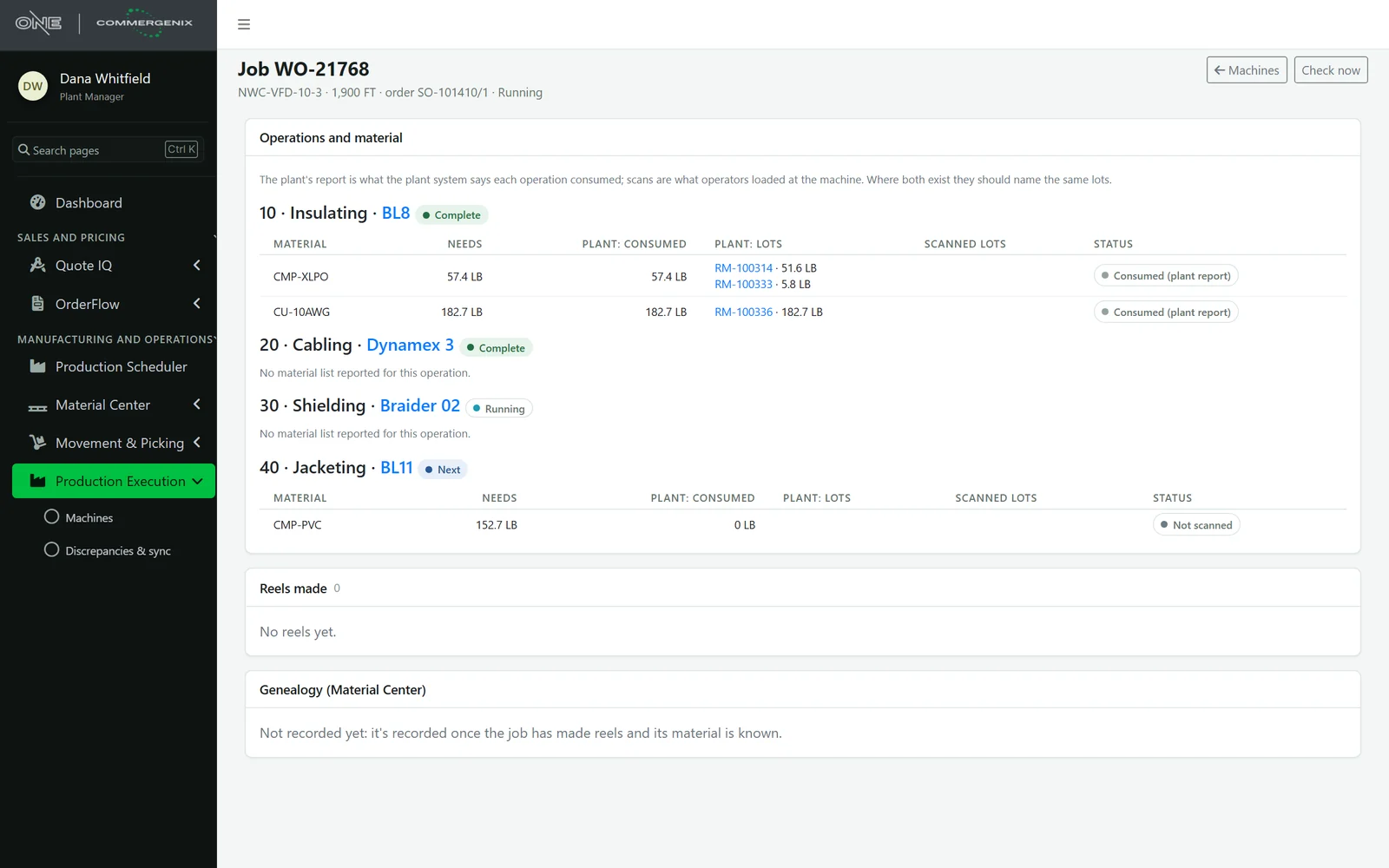
A job page walks its operations in order: the machine, the status, and for each material what’s needed, what the plant reports consuming, the plant’s lots, the lots operators scanned, and whether they agree. Below are the reels the job made.
- Genealogy into Material Center: lots in and reels out are recorded, using operators’ scans where there are any and the plant’s consumption report where there aren’t. The page says which.
- From the reel back: each reel’s page in Material Center shows the lots it was made from.
A layer over your plant system, not a replacement.
Your plant system stays the record for jobs, operations, quantities and reels. Production Execution reads them through the Commergenix plant feed and keeps no copy. It adds what the plant system doesn’t have: operators’ scans, the discrepancies between the two records, and the genealogy in Material Center. Setups, downtime, scrap, and starting or completing operations stay in your plant system.
Evidence, not edits.
A scan is evidence
Scans are recorded with the lot, quantity, who and when. They never overwrite what the plant system says.
Wrong material is stopped
Lots that are on hold, red-tagged, rejected or not on the material list are refused with “Don’t load it”.
Withdrawals stay visible
A wrong scan is withdrawn with a reason by the operator who made it or by a supervisor. It stays in the record.
Roles that match the floor
Operators scan and withdraw their own scans. Supervisors also withdraw others’ scans, resolve discrepancies and reconcile on demand.
Self-closing mismatches
A discrepancy closes on its own once the records agree, so the list is only what still needs attention.
Your plant stays yours
Each company’s machines, jobs, scans and discrepancies are kept separate and shown only to that company’s users.
For plants that have to prove what’s in the product.
Wire and cable manufacturers
Copper and compound lots into insulated, cabled, shielded and jacketed reels, traced at every step.
Machine operators
One screen per machine: what’s running, what’s next, and a scan that tells you right away if it’s the wrong lot.
Quality and plant leaders
See where the records disagree, fix them while the job is fresh, and answer “what’s in this reel” from a single page.
Common questions
Does it replace our plant system or MES?
No. The plant system stays the record for jobs, operations, quantities and reels. Production Execution reads them and adds operators’ lot scans, discrepancies and genealogy.
What happens if an operator scans the wrong lot?
If it isn’t on the operation’s material list, isn’t quality-released or has left the plant, the scan is refused with the reason. If the scan is recorded but disagrees with the plant’s report, a discrepancy opens.
Will it change quantities in our plant system?
No. A scan is evidence. When it disagrees with the plant, your team corrects the plant system or withdraws the scan.
Does it work offline?
A scan counts only when the server confirms it. Offline, nothing is sent and the scan stays on screen, so nobody thinks it was recorded when it wasn’t.
What does it need?
The Commergenix plant feed from your plant system, and Material Center for lots, quality status and genealogy.
Works alongside
Every Commergenix module shares one sign-in, one job engine, and one set of integrations, so each one you add makes the others more useful.
Material Center
Every reel, spool, lot and remnant tracked as a physical unit: where it is, how much is left, its quality status and the job it’s for.
Learn more →Production Scheduler
Your schedule beside a predicted finish for every order, learned from how your machines actually run.
Learn more →Movement & Picking
Moves on any phone or scanner, verified by scan at pickup and at delivery, so the right reel reaches the right place.
Learn more →Trace one of your reels with us.
Connect your plant system and Material Center, and see your machines, your jobs and the lots behind each reel.