Product Sources
Your manufacturers already wrote your product data.
The UPCs, weights and part numbers missing from your catalog are sitting in spec sheets and price books on your suppliers’ websites. Product Sources finds those documents, reads them product by product, and hands your team values to approve, each with the line and page it came from.
Blank fields cost you search results, marketplace listings and freight quotes.
The numbers you need already exist. Getting them into your catalog by hand is slow, and getting them wrong is worse.
-
The data exists
Manufacturers publish catalogs, submittals and spec sheets with the exact numbers you need. They just don’t send them to you in a format your PIM can load.
-
It’s buried
The weight for one SKU is on page 29 of a 300-page catalog. The UPC is on a price sheet. Finding them by hand takes a person an afternoon per brand.
-
Copy and paste is risky
A typo in a barcode, or a weight in kilograms where you expected pounds, goes live, gets syndicated, and is hard to trace back.
From a manufacturer’s website to an approved value, with a person deciding at the end.
Rules handle what rules can. AI reads the rest, and has to quote the document for every value it suggests.
-
Collect the documents
The PDFs already linked to your products, plus catalogs and spec sheets found on each approved manufacturer’s website through its sitemaps, a polite crawl and site search. You can also drop in files you already have.
-
Match to your products
Every document is matched to the products you carry by part number, page by page. “ZN415-4NH” matches “ZN 415 4NH”. A 300-page catalog becomes a short read per product.
-
Read the fields you choose
Rules find what they can, such as barcodes with a valid check digit. AI reads the rest and must quote the document. A value whose quote isn’t in the document is thrown out.
-
Approve and write back
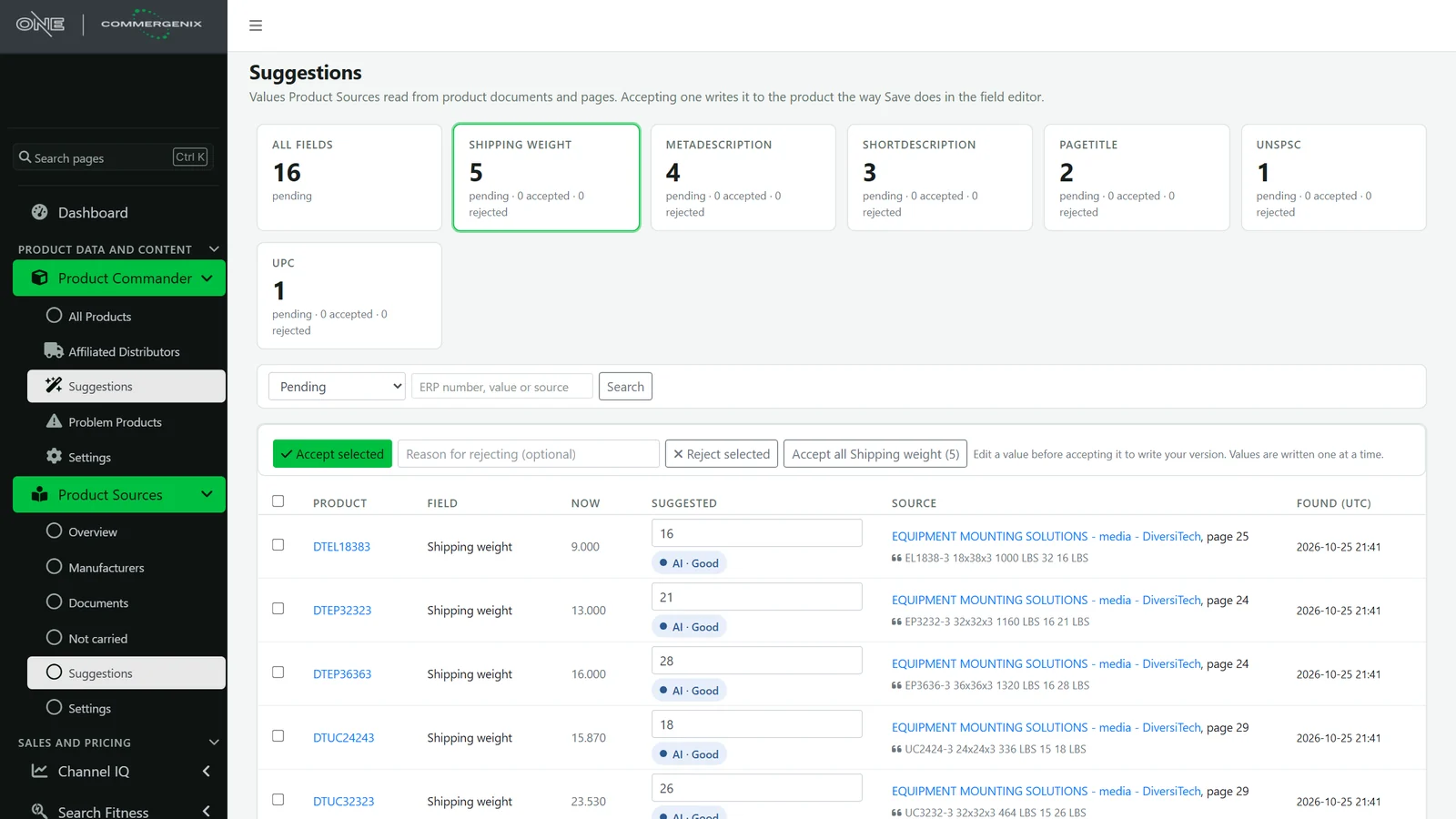
Suggestions wait in Product Commander. Accept one, a selection, or a whole field at once. Accepted values are saved to your system of record with an audit trail.
Every suggestion shows its receipt.
Each value shows the document it came from, the page and the exact words. Your reviewer can check it in seconds, and click through to the PDF to see more.
- Confidence is shown with each value, so you know which ones to read closely.
- What you have now sits beside what was found, so a change is obvious.
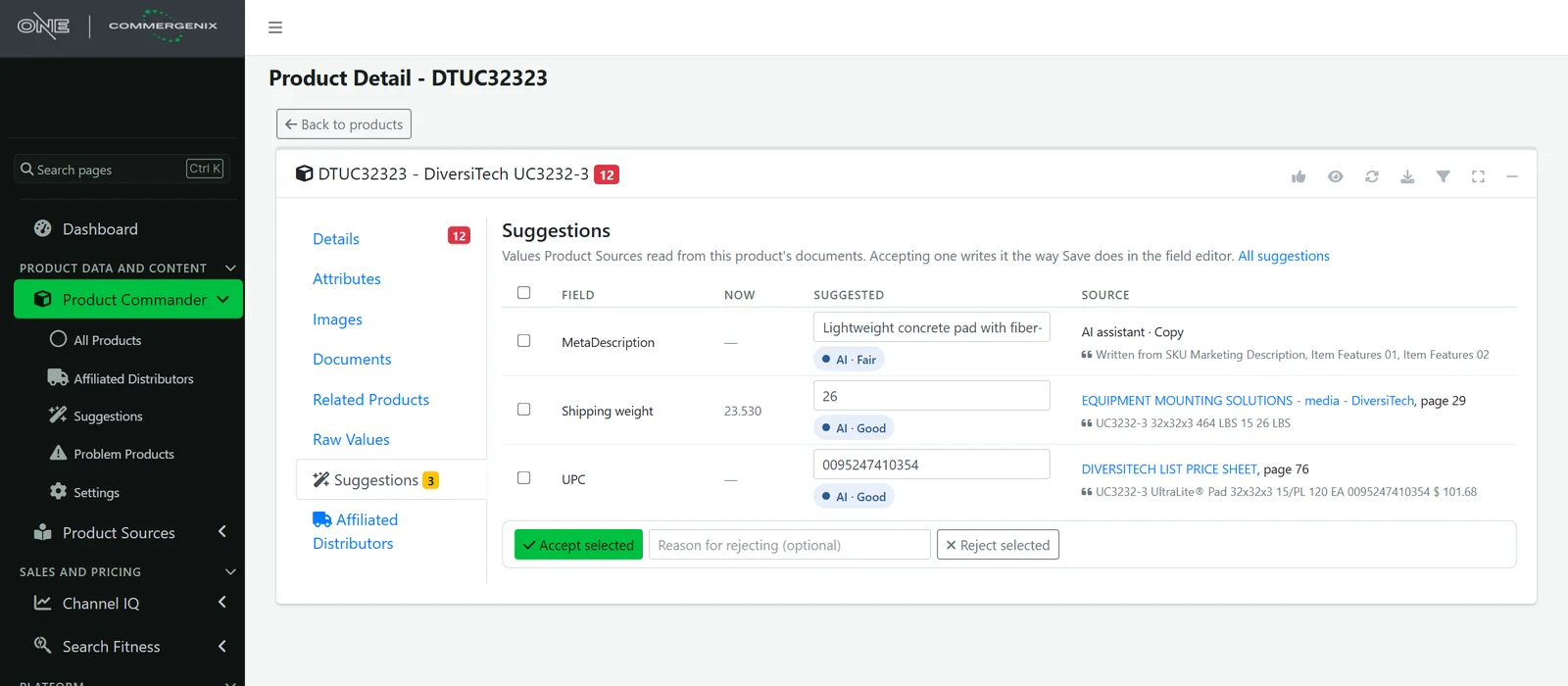
- On each product, too: the same suggestions appear on the product’s own page in Product Commander.
It goes to the source, after you say which source.
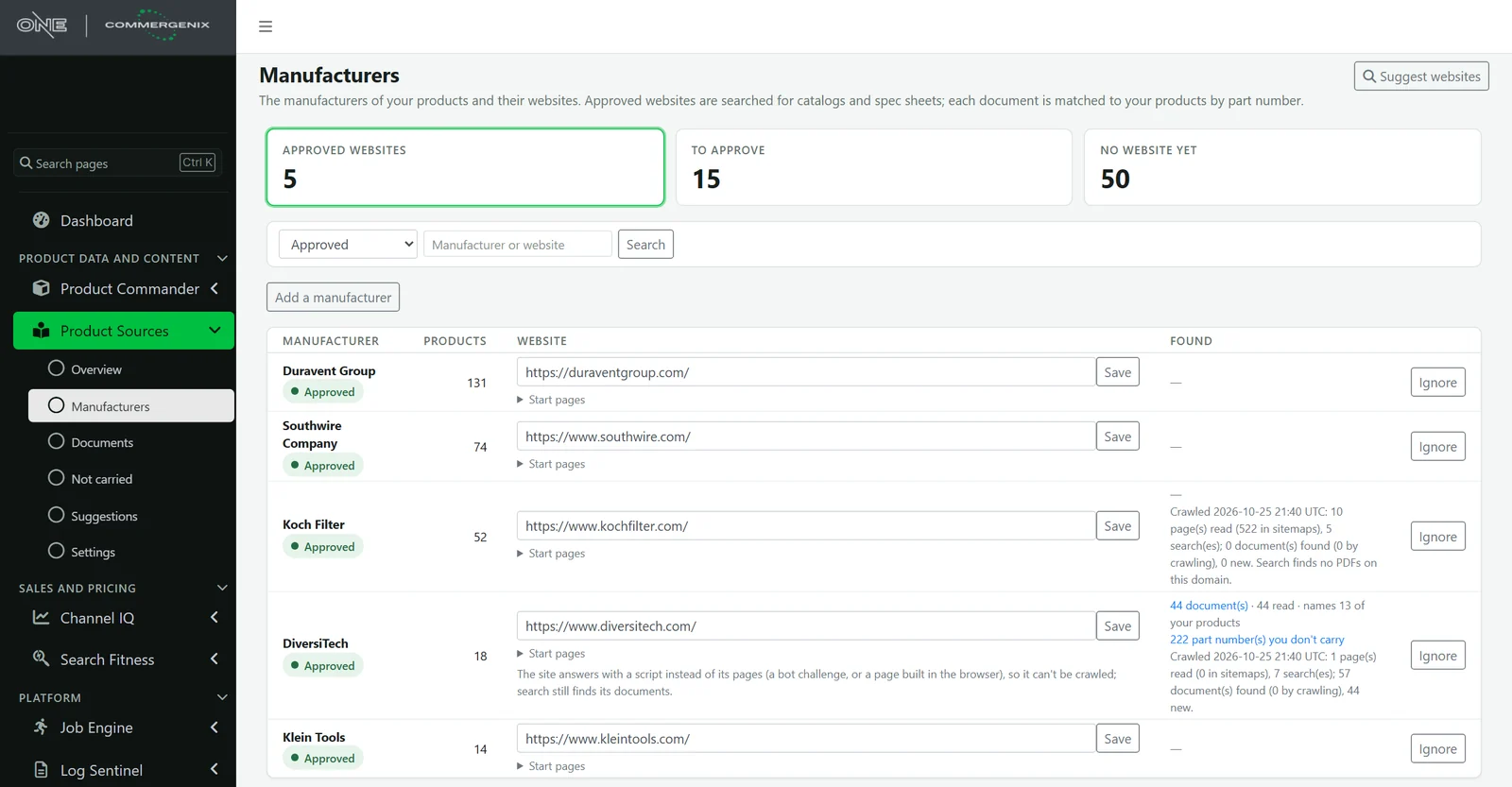
Product Sources lists the manufacturers behind your active products, ranked by how many you carry. Enter a website or let search suggest one. Nothing is read until an Admin approves the address.
- Sitemaps, crawl and search together, so even sites built in JavaScript or behind a bot check still give up their indexed PDFs.
- Start pages, such as a literature library, point the crawl to where the documents are.
- Fresh, not wasteful: documents are checked about weekly and read again only when they change.
See what your suppliers make that you don’t sell.
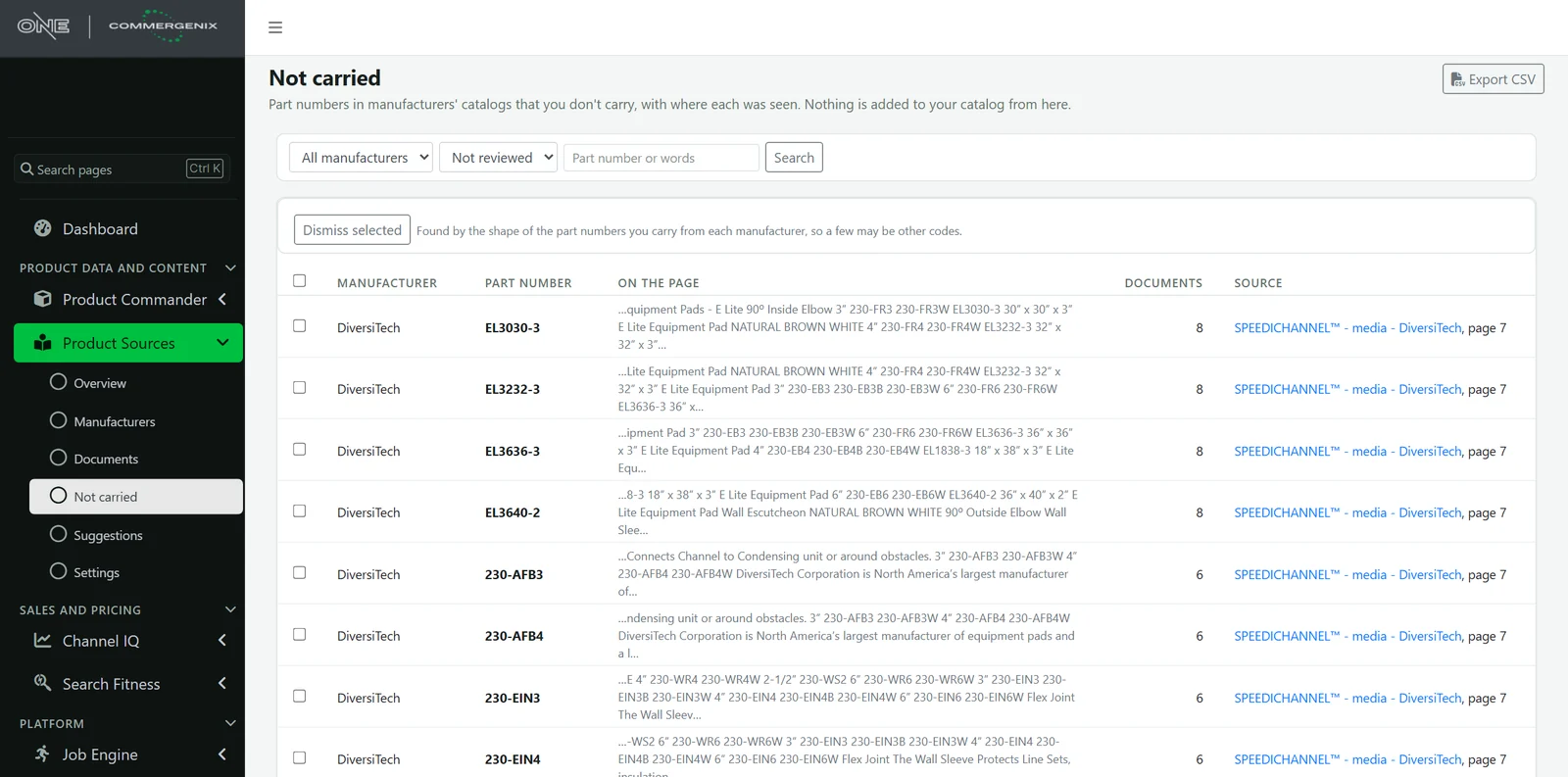
While reading a manufacturer’s catalog, Product Sources also lists part numbers that look like the ones you carry from that brand but aren’t in your catalog. Each shows the words around it, the document and the page.
- Built for merchandising: spot sizes, colors and accessories missing from a line you already sell.
- Review only: nothing is added to your catalog. Dismiss what isn’t of interest and export the rest to CSV.
Drop in the price books you already have.
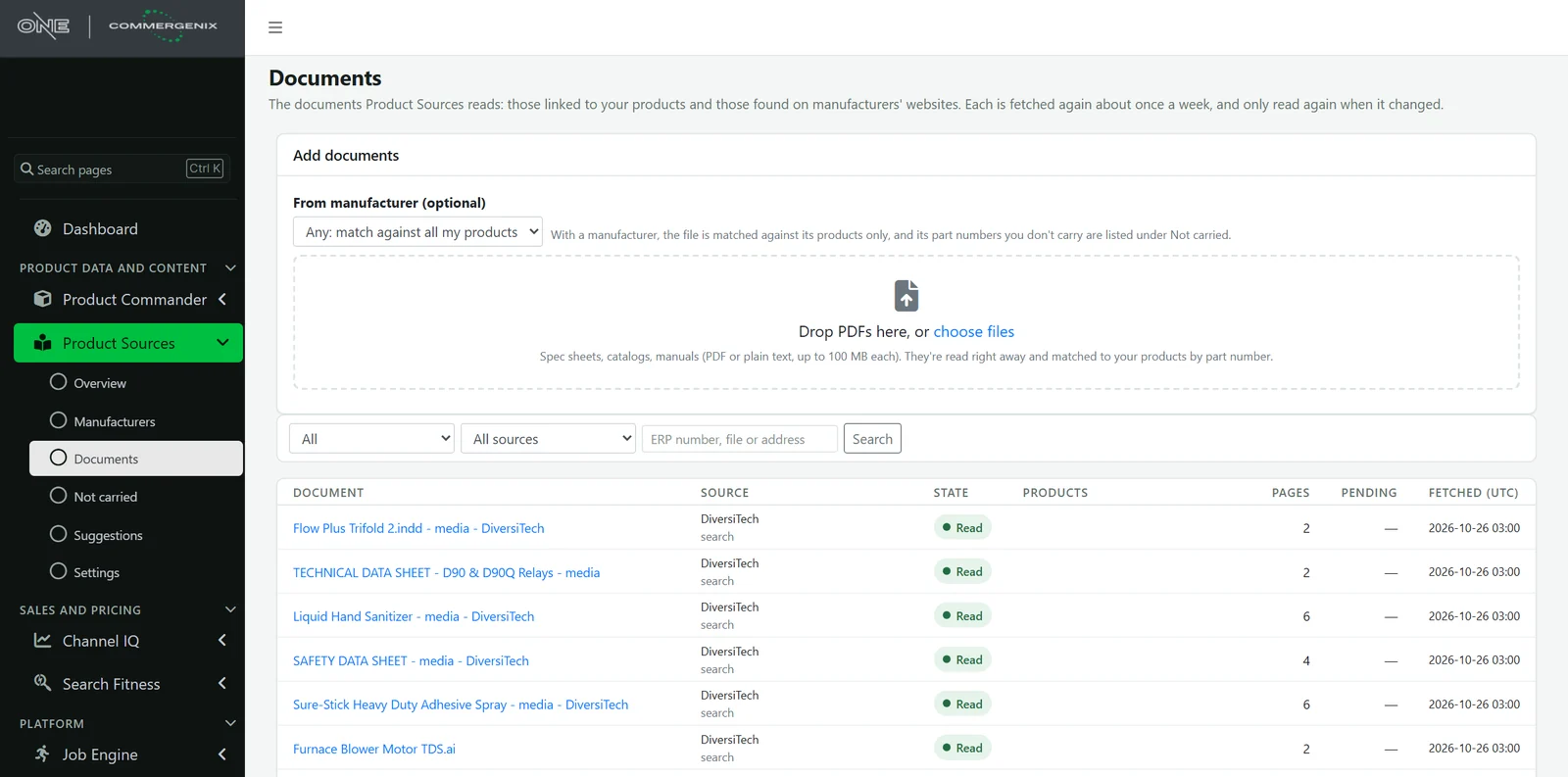
Drag PDFs or text files onto the Documents page, up to 100 MB each, many at once. Pick the manufacturer and the file is matched against that brand’s products. It’s read straight away, and its suggestions join the same review queue.
- One list of every document, whether linked, found on a website or uploaded, with its pages, state and pending suggestions.
- Kept private: uploaded files open only for your company.
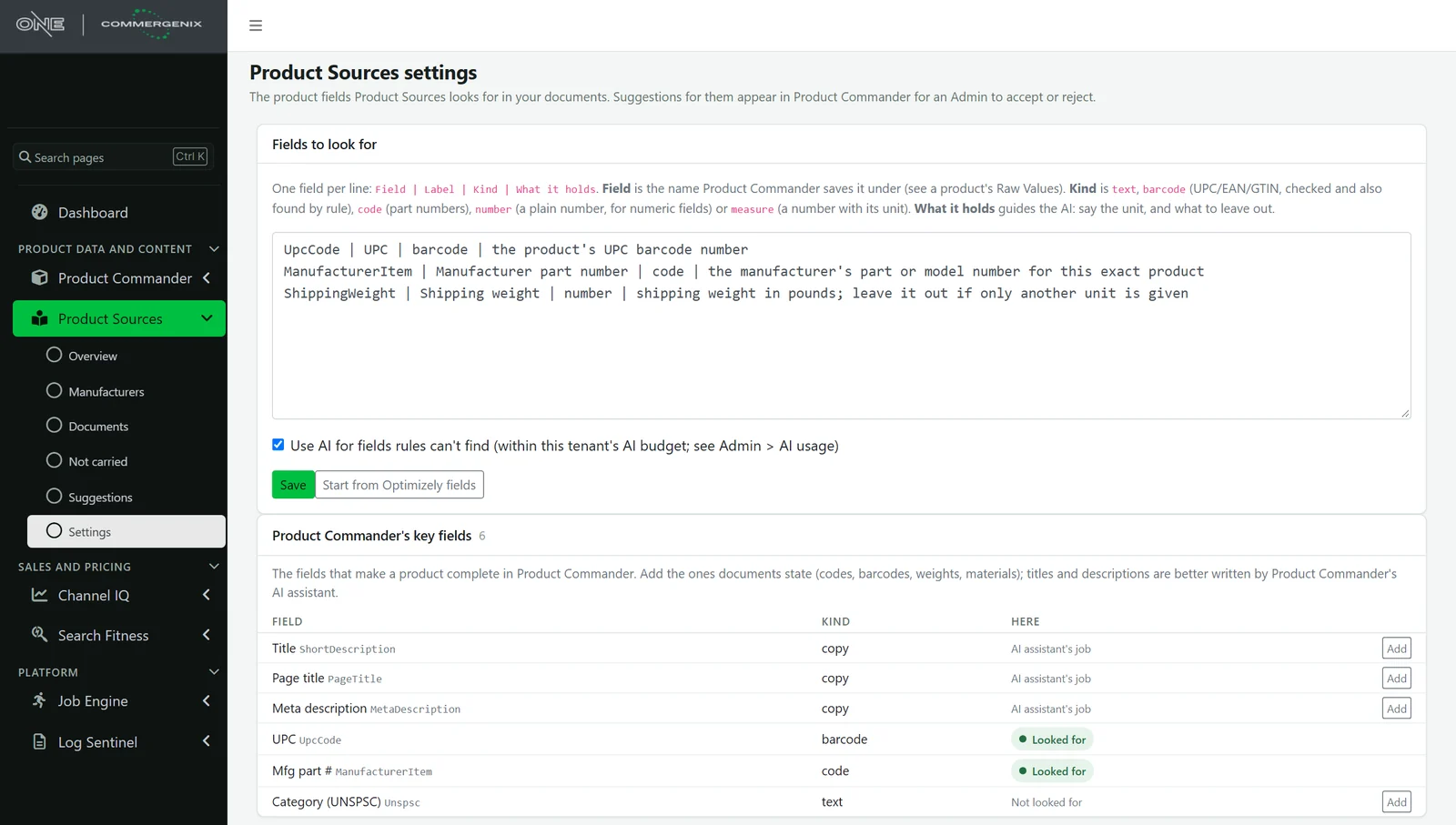
Tell it what to look for in plain language.
List the fields you want filled, what kind of value each is, and a sentence on what counts, such as “shipping weight in pounds; leave it out if only another unit is given”. Field kinds keep values clean: barcodes are checked, part numbers compare without punctuation, and numbers keep only the number.
- Starts from your platform’s fields, with a one-click preset.
- Rules only is one checkbox away if you’d rather not use AI.
A wrong value never goes live unless someone chooses it.
Product Sources only suggests. Values reach your products when an Admin accepts them, through the same save Product Commander’s field editor uses: your system of record first, then the audit log, with who accepted it and from which document.
- No quote, no suggestion. The AI has to quote the document, and the quote has to be found in the document and contain the value. Anything it can’t back up is dropped before you see it.
- No nagging. A value you reject is never suggested again, and a value your product already has isn’t suggested. When a document changes, its old pending readings are replaced.
- A budget you set. AI use is metered per company with a monthly cap. When the cap is reached, AI pauses and rules keep working until the month turns or the cap is raised.
- A good web citizen. It honors robots.txt and crawl delays, waits between requests to the same site, fetches only what changed, and reaches public addresses only.
- Approved websites only. Search can suggest a manufacturer’s website, but a person approves it before anything there is read.
For the people who own product data.
Catalog and PIM managers
Close the gaps in UPCs, weights and manufacturer part numbers across thousands of SKUs without opening a single PDF.
eCommerce teams
Complete listings rank better and convert better. Approved values flow to your storefront the same way a manual edit does.
Category and purchasing
See the rest of each supplier’s line, with the catalog page to prove it, when you plan what to add next.
Common questions
Where do accepted values go?
To the system your products live in, through Product Commander. For Optimizely Configured Commerce, for example, the value is saved to Optimizely first, then to Product Commander’s copy, with the change in the audit log.
Does it change my products on its own?
No. Every value waits for an Admin. You can accept one, a selection, or every pending value of a field in one pass. A value your platform refuses stays in the queue with the reason.
What if a manufacturer’s site blocks crawlers?
Product Sources doesn’t work around blocks. Site search often still finds that manufacturer’s published PDFs, and you can upload documents you already have.
Which fields can it fill?
Any field you can describe: barcodes, manufacturer part numbers, weights, dimensions, ratings, materials. Titles and descriptions are better written by Product Commander’s AI assistant, which uses the same review queue.
How much AI does it use?
Rules run first and cost nothing. For the rest, it reads only the pages that name each product, so even a large catalog is a short read per product. Usage counts against a monthly budget your administrator sets.
Does it add new products to my catalog?
No. Part numbers you don’t carry are listed for review and export only.
Works alongside
Every Commergenix module shares one sign-in, one job engine, and one set of integrations, so each one you add makes the others more useful.
Product Commander
Shows what’s missing across your catalog, lines up every source of product data, and saves approved values to the system you sell from. Product Sources suggestions are reviewed here.
Learn more →Data Auditor
Rule-based data-quality audits of your PIM, with run history and detail on every issue found.
Learn more →Product Image Forge
Produces catalog images in bulk, with wire and cable renders from Layer One’s CableViz Studio.
Learn more →Start with the brands you carry most.
Approve a few manufacturer websites, choose the fields that matter, and your first suggestions are waiting the next morning. Tell us about your catalog and we’ll show you Product Sources on your own products.