Product Commander
Complete product data, without the spreadsheet.
Product Commander shows what’s missing across your catalog, lines up every source of product data side by side, and saves the right value straight to the system you already sell from.
Incomplete product data costs sales.
Shoppers can’t find a product, can’t compare it, and can’t trust it. Fixing that is hard because every SKU pulls from several sources: your ERP, distributor feeds, manufacturer catalogs and spec sheets. None of them line up.
Merging a few products is tedious. Doing it for thousands of SKUs is a full-time job, and it never ends: feeds update, new products arrive, and specs change.
Product Commander gives our small ecommerce team the speed and agility we need to confidently manage product data for a continuously growing product catalog.
One place for your team to fix product data.
Product Commander brings feed values, manufacturer documents and AI suggestions together, shows your merchandisers where to start, and saves only what they approve.
-
See what’s missing
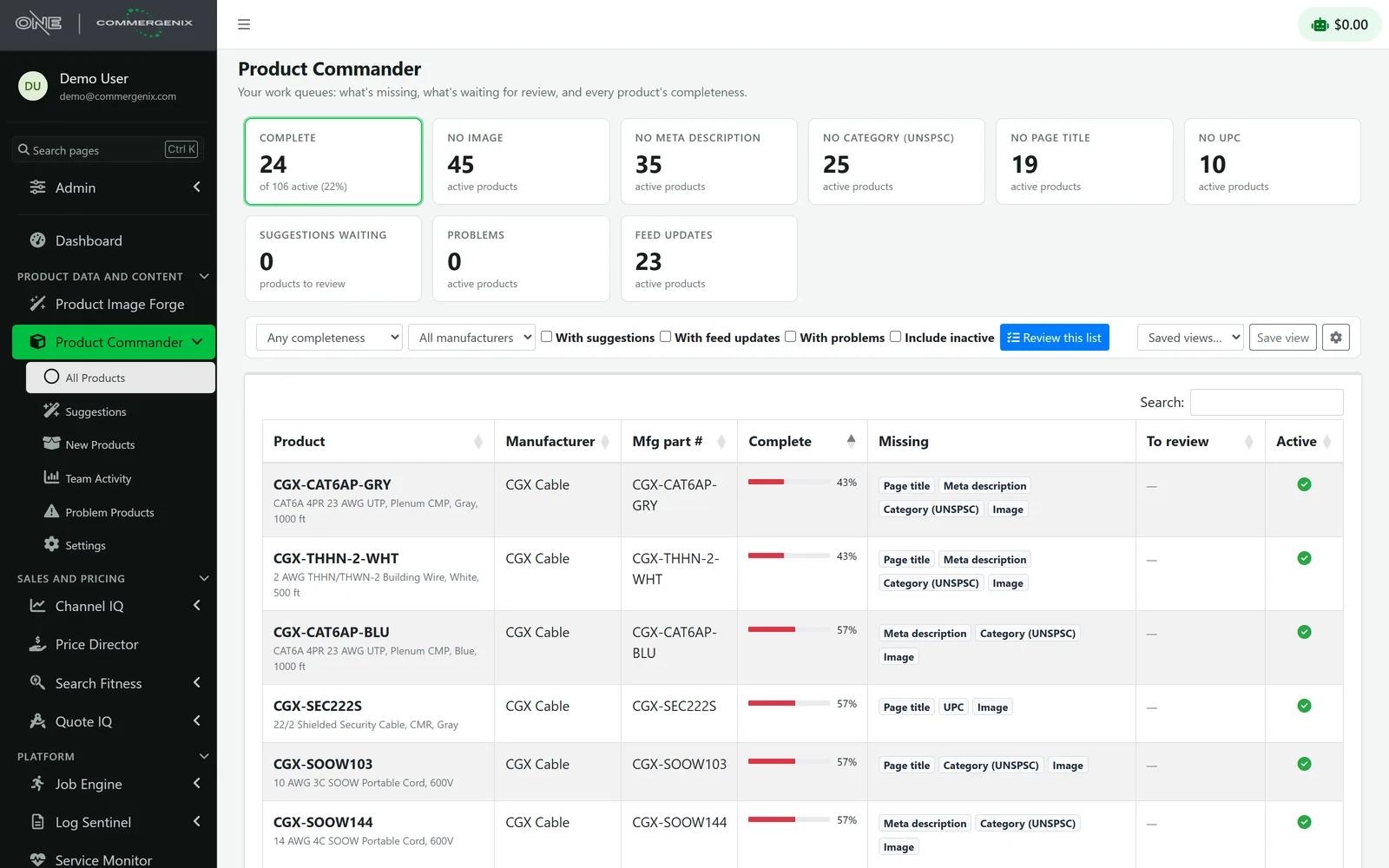
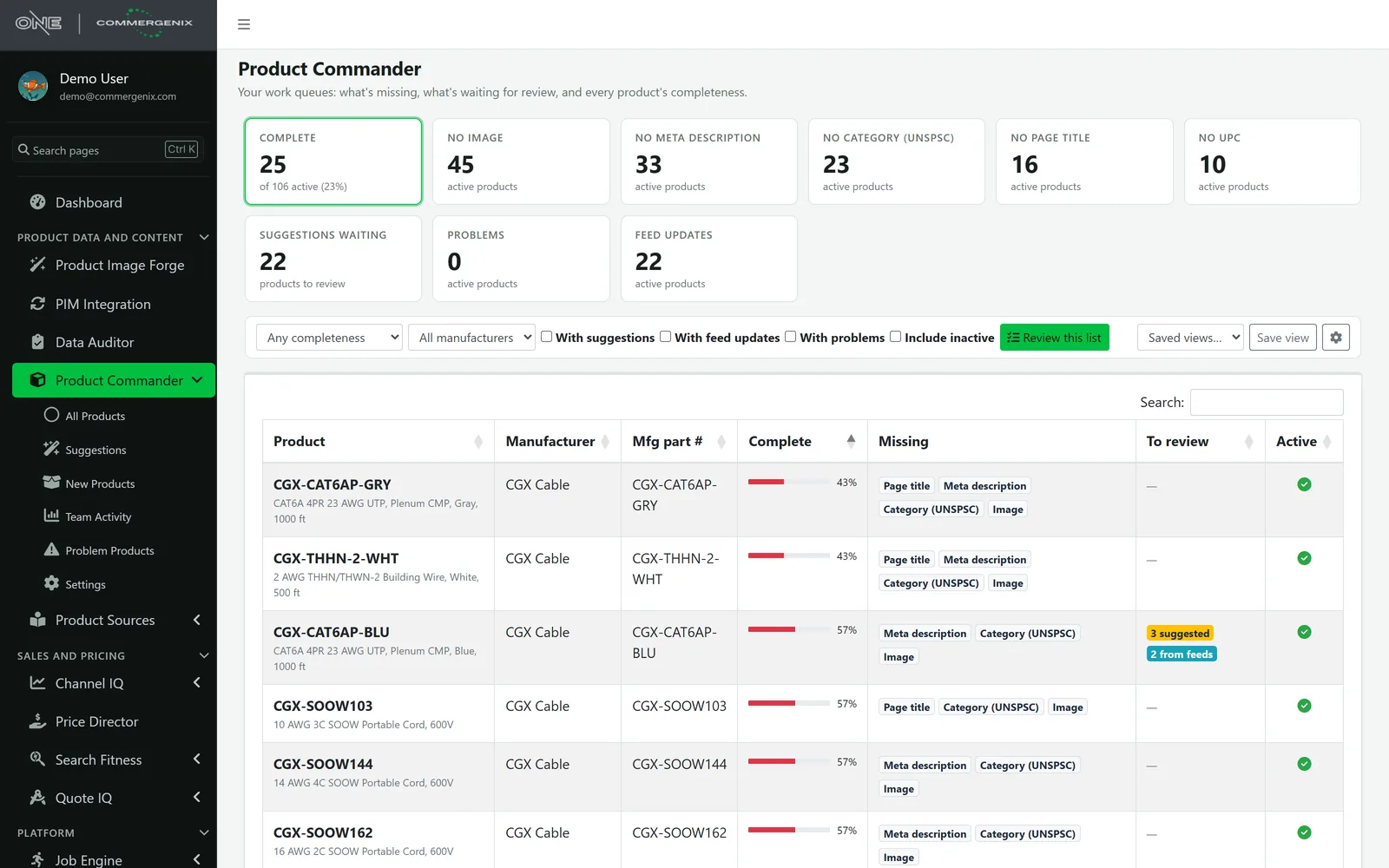
Every product gets a completeness score, least complete first, with work queues for the gaps that matter.
-
Compare every source
The current value sits beside values from the Affiliated Distributors feed, manufacturer documents and AI suggestions.
-
Pick the right value
Use a suggestion or keep the current value in one click, product by product through any list.
-
Save where you sell
Approved values go straight to your product system, with full history and undo.
Every product, every field, ready to sell.
Less time hunting through spreadsheets and systems, fewer errors reaching buyers, and a clear record of every change.
See what’s missing, at a glance
A completeness score for every product, least complete first. Work queues for no image, no description, suggestions waiting, feed updates, and your own key fields, with filters and saved views the whole team shares.
One review screen for every field
The current value beside values from the Affiliated Distributors feed, manufacturer documents, and AI suggestions. Use or keep current in one click, and work through any filtered list product by product.
Manufacturer data, found for you
With Product Sources, manufacturer catalogs and spec sheets that name your part numbers are read for field values, with the page each one came from. Part numbers you don’t carry yet are listed under New Products.
Quality checks, always on
Flags titles that are too long, too short, or duplicated, leftover placeholder text, and garbled characters. Spots feed problems such as blank or mismatched part numbers before they reach your storefront.
Saved where you sell
Approved values go straight to the system you already sell from, such as Optimizely Configured Commerce, and then to Commergenix’s own copy.
Every change, accounted for
Full history for each product: who changed what, from which source, and when, with undo. Team activity shows values saved, gaps filled, and how suggestions from each source were decided.
Every gap is a list you can work through.
Click a tile and the list narrows to those products. Add a manufacturer or “with suggestions” filter, save the view for next week, and press Review this list to step through it one product at a time.
- Saved views for the lists your team works every week.
- Completeness on every row: a percentage and the fields still missing.
- Problem products: data problems the product jobs find, such as blank part numbers or products missing from a feed, get their own list and clear themselves once fixed.
Values found for you, with the evidence.
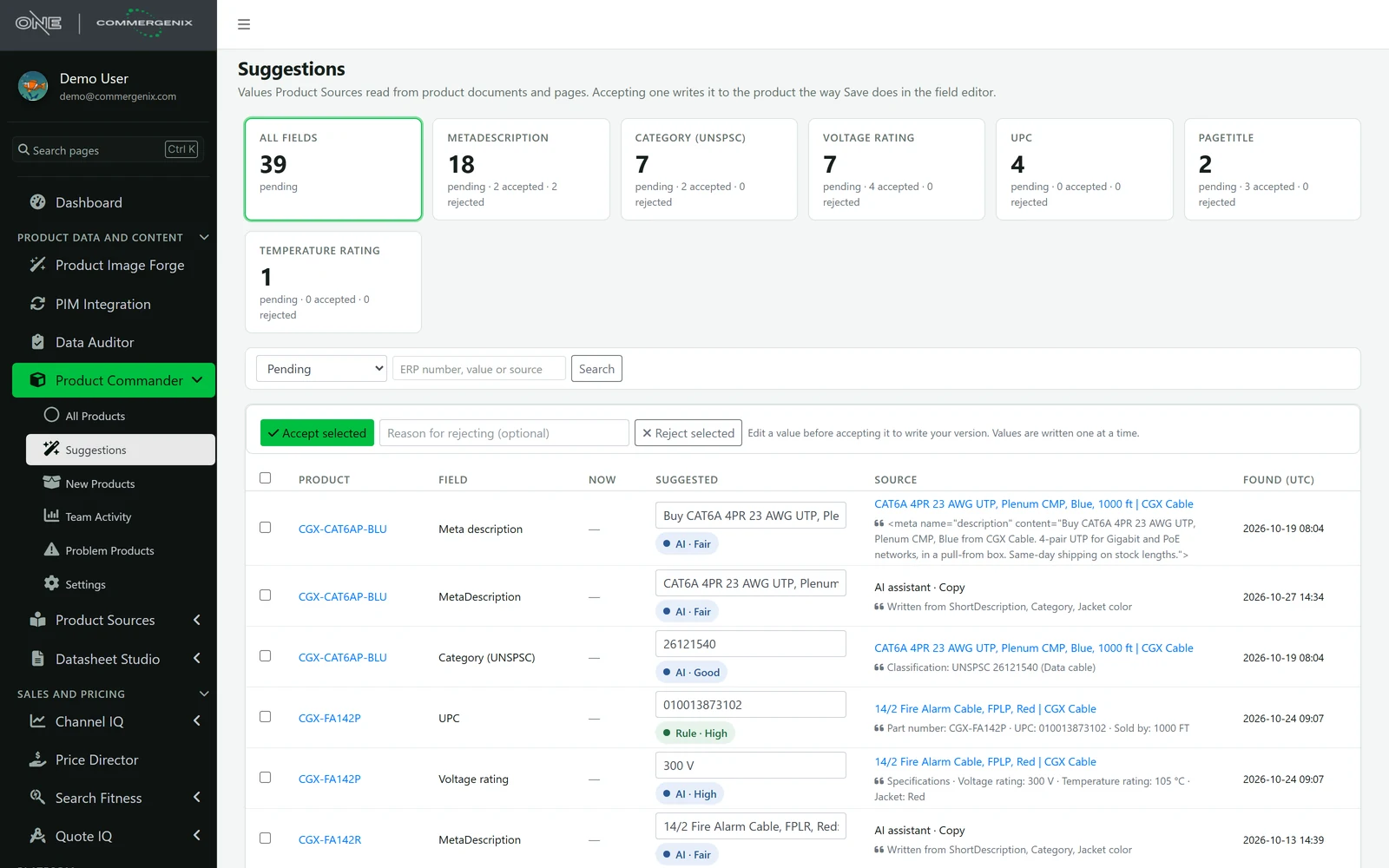
Product Sources reads manufacturer documents and product pages, and the AI assistant drafts copy. Every value it finds waits here with where it came from, the text it was read from and a confidence. Accept a batch, edit one first, or reject with a reason.
- Nothing is written until someone accepts it, and accepting saves the value the same way typing it would.
- New Products: part numbers found in manufacturer documents that you don’t carry, with the words around them. Admins set aside the ones they don’t want and, where your platform supports it, create the others one at a time.
- Counts per field: pending, accepted and rejected for each field, so you can see which sources earn trust.
Each product’s key fields, checked and side by side.
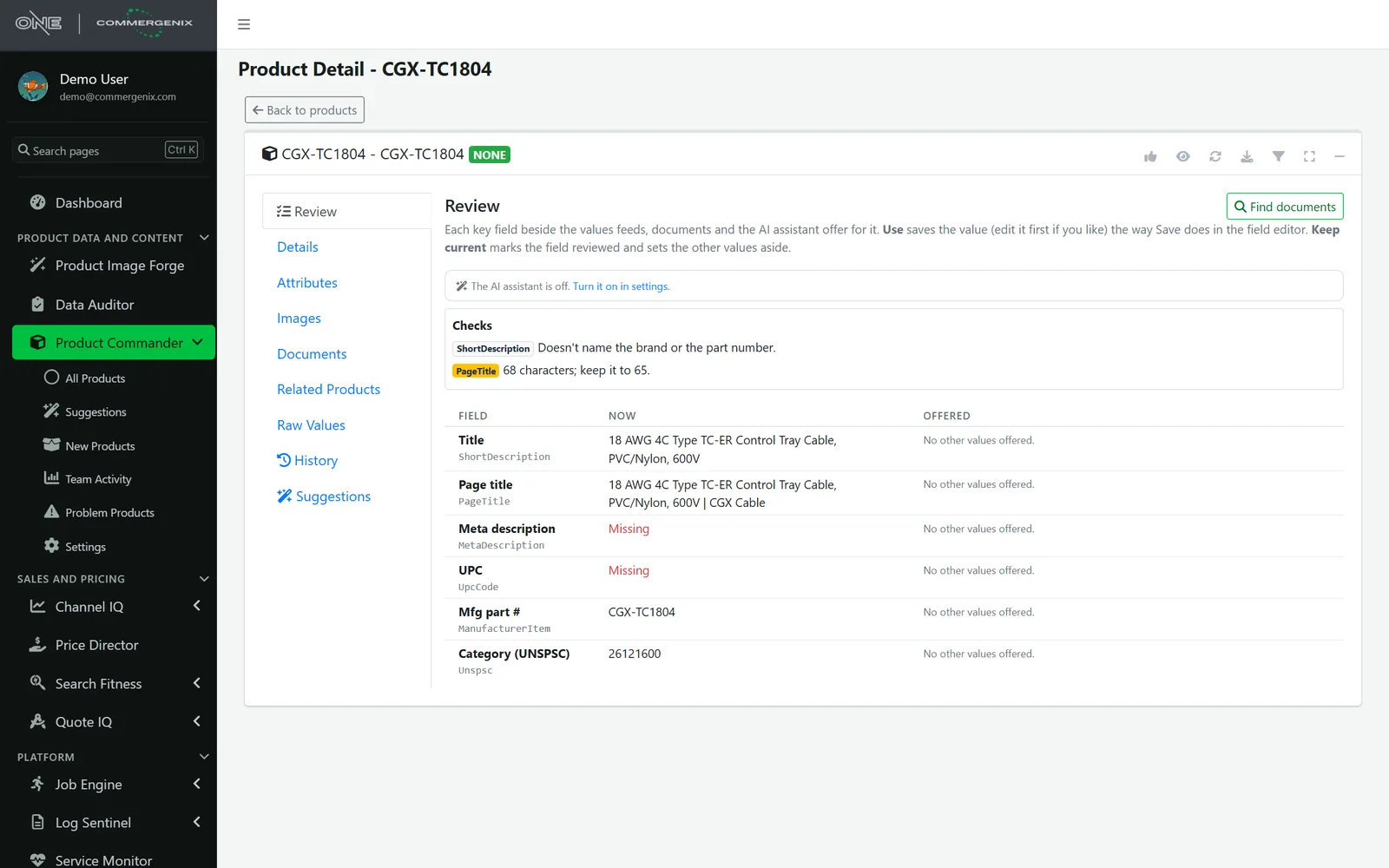
The Review tab lists every key field with its current value and the values on offer from feeds, documents and the AI assistant. Use one (edit it first if you like), or Keep current to mark the field reviewed.
- Checks on what’s there: too long or too short, written in capitals, placeholder text, garbled characters, double spaces, a title another product already uses, a title that doesn’t name the brand or part number.
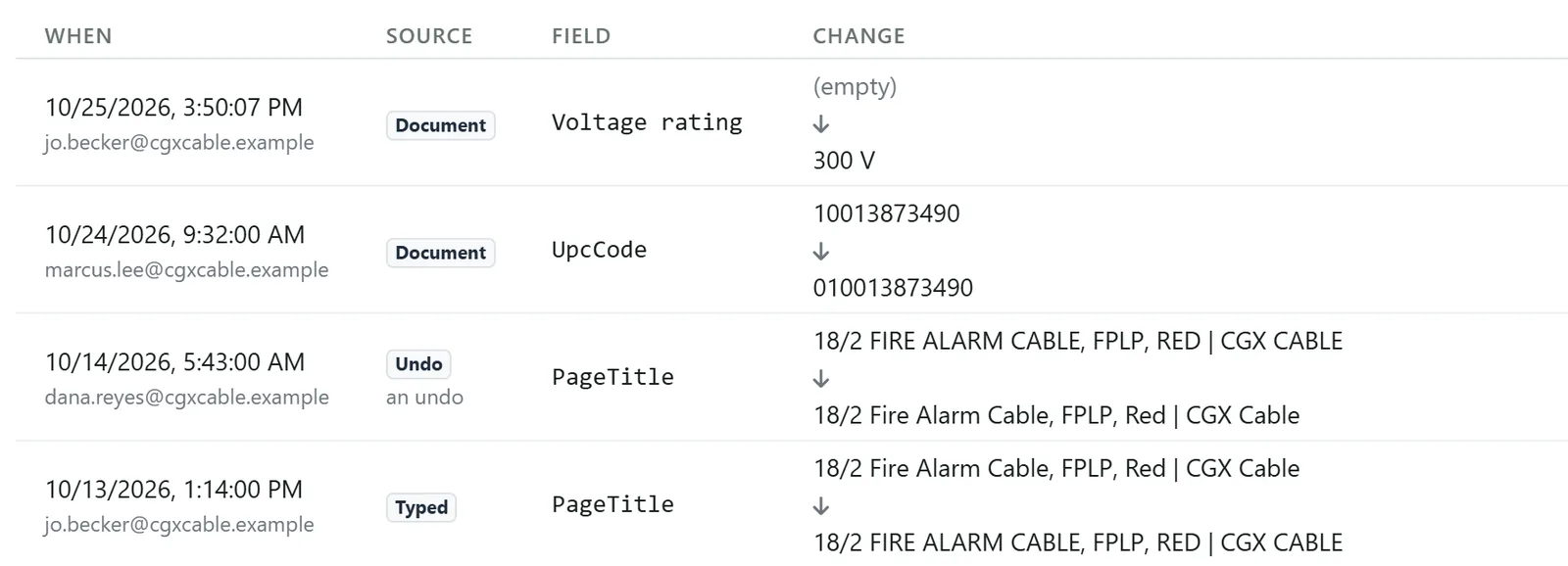
- History with undo: every save, review decision and feed change, newest first, with who made it and where the value came from. Undo puts back the value a save replaced, as long as the field hasn’t changed since.
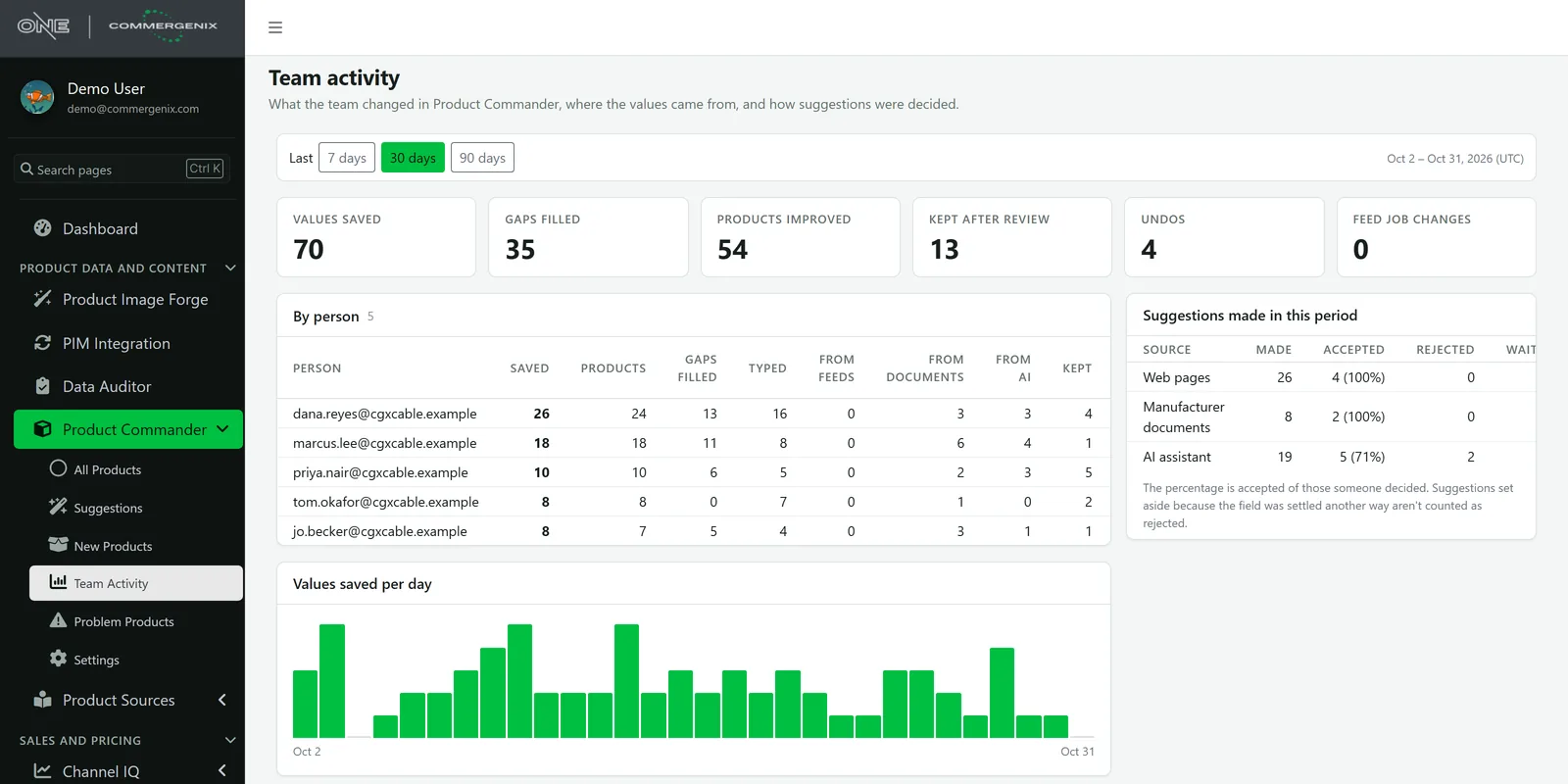
See what the team got done.
For the last 7, 30 or 90 days: values saved, gaps filled, products improved and undos, then the same by person, split into typed, from feeds, from documents and from the AI assistant. Each source shows how many of its suggestions were accepted.
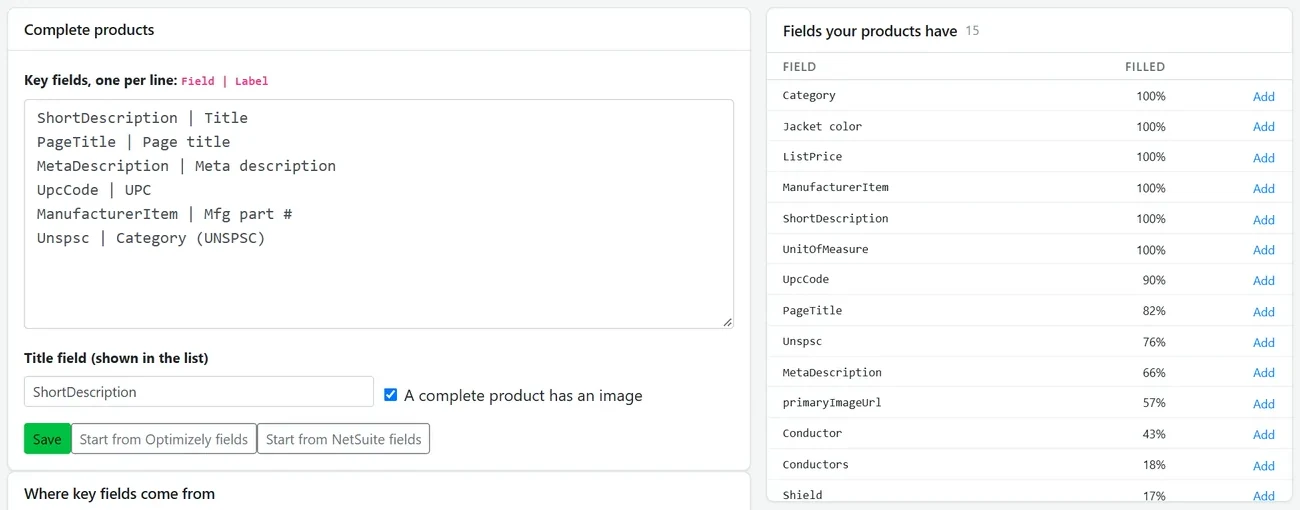
You decide what a finished product looks like.
List the key fields and their labels, choose the title field, and say whether an image is required. The work queues and every product’s score come from these settings. Start from your product system’s own fields, and see how full each field is across the catalog.
- Where values come from: for each field, whether Product Sources looks for it in documents and what the AI assistant does with it.
An assistant that suggests. Your team decides.
The optional AI assistant handles the writing and attribute work that piles up, in your own style, and never saves anything on its own.
- Writes in your style guide: titles, descriptions, meta descriptions, and bullet points.
- Fills attributes such as color and finish, using only values your catalog already uses.
- Suggests categories already in use, writes image alt text, and proofreads copy.
- Checks every answer before suggesting it: copy can’t add numbers the product’s facts don’t have, and list fields must use a value already in your catalog.
- Suggests only. Nothing is saved until a person approves it.
- Runs on a whole list at once, with a cost estimate up front.
- Stays inside your monthly AI budget. Everything else keeps working when the budget is used up.
Connected to the system you sell from.
Product Commander reads your catalog and saves approved values back to your product system. Running something not listed here? Tell us what you use.
 Optimizely Configured Commerce: reads and saves
- Optimizely PIM: reads and saves
 NetSuite: talk to us
 Akeneo PIM: reads only
 Affiliated Distributors feed: reads only
Works alongside
Every Commergenix module shares one sign-in, one job engine, and one set of integrations, so each one you add makes the others more useful.
Product Sources
Gathers product information from manufacturer websites and PDF spec sheets, then proposes updates for a person to review and approve.
Learn more →Data Auditor
Rule-based data-quality audits of your PIM, with run history and detail on every issue found.
Learn more →Product Image Forge
Produces catalog images in bulk, with wire and cable renders from Layer One’s CableViz Studio.
Learn more →Turn product data from a backlog into a workflow your team can finish.
Tell us about your catalog, your feeds, and where your product data gets stuck. We’ll show you where Product Commander helps and tell you honestly where it doesn’t.