Data Auditor
Find the bad product data before your customers do.
Data Auditor runs your catalog rules against every product in your PIM on a schedule. Each morning you see what’s wrong, what’s new since yesterday, and what your team fixed, product by product and rule by rule.
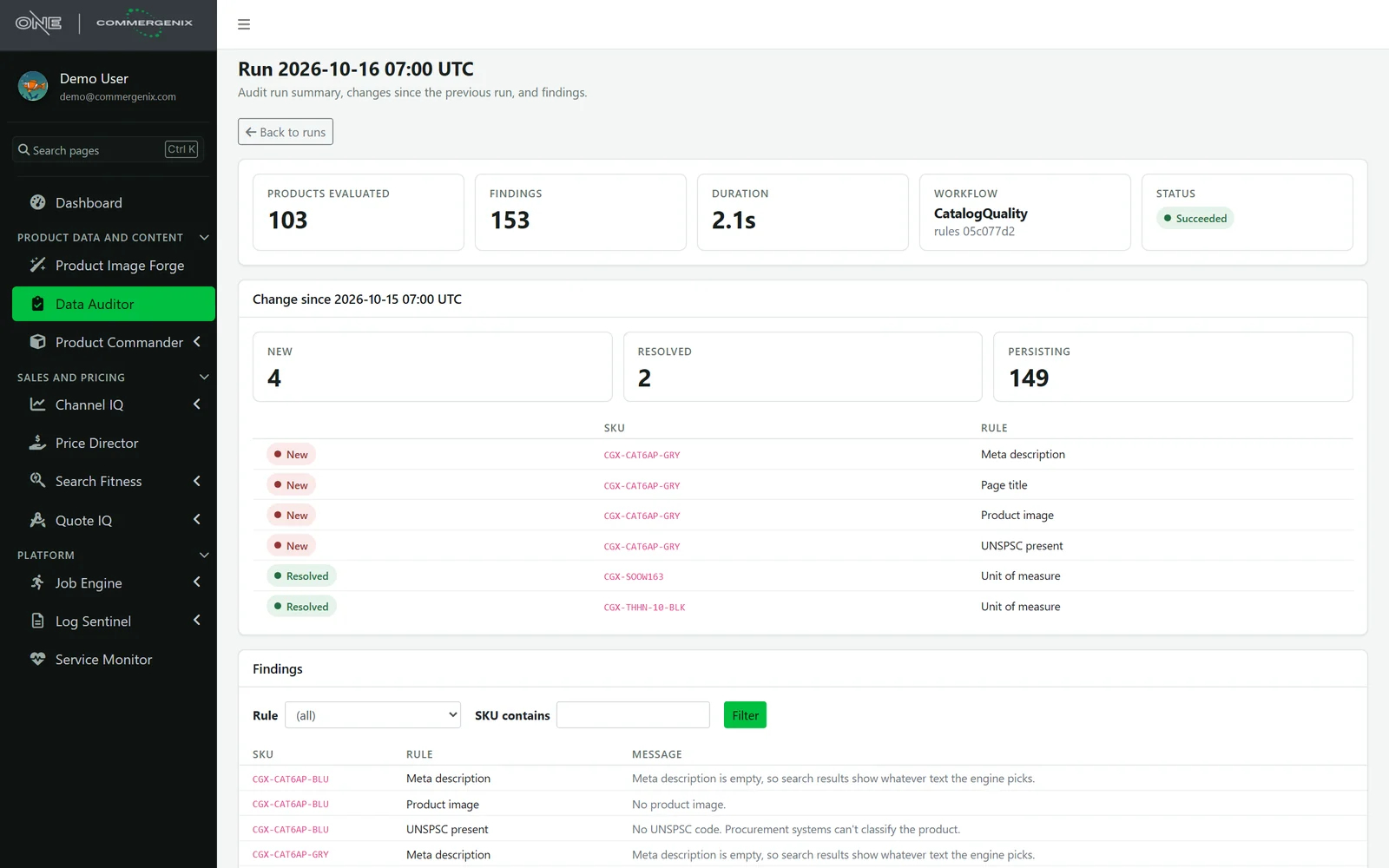
A catalog drifts a little every day, and nobody notices until a customer does.
Bad product data rarely arrives with an error message. It just goes live.
-
Imports go wrong quietly
A spreadsheet drops a UPC’s leading zero. A bulk edit sets the wrong color on a whole size run. Nothing errors; the data is just wrong.
-
The rules live in people’s heads
Your product managers know a red SKU should have a red jacket, and that fire alarm cable is always red. The PIM doesn’t.
-
Spot checks don’t scale
Thousands of SKUs, dozens of attributes each. Reviewing them by hand means reviewing a few and hoping for the rest.
Write the rule once. Every product is checked against it, every night.
The audit only reads. Your team fixes data in the PIM the way it does today, and the next run shows the fix.
-
Say what correct looks like
Each rule is one short expression about a product: a field must be filled, a value must match the SKU, a code must fit the category. Rules are edited in the browser and checked before they’re saved.
-
Check every product
On its schedule, the audit reads your catalog from the PIM and runs every rule against every product. It only reads; it never changes a value.
-
See what changed
Each run is saved as a snapshot and compared with the one before: findings that are new, findings that were resolved, and findings that persist.
-
Work the list
Filter by rule or SKU and hand the list to whoever owns it. Tomorrow’s run shows the fixes as resolved.
A daily record of your catalog’s health.
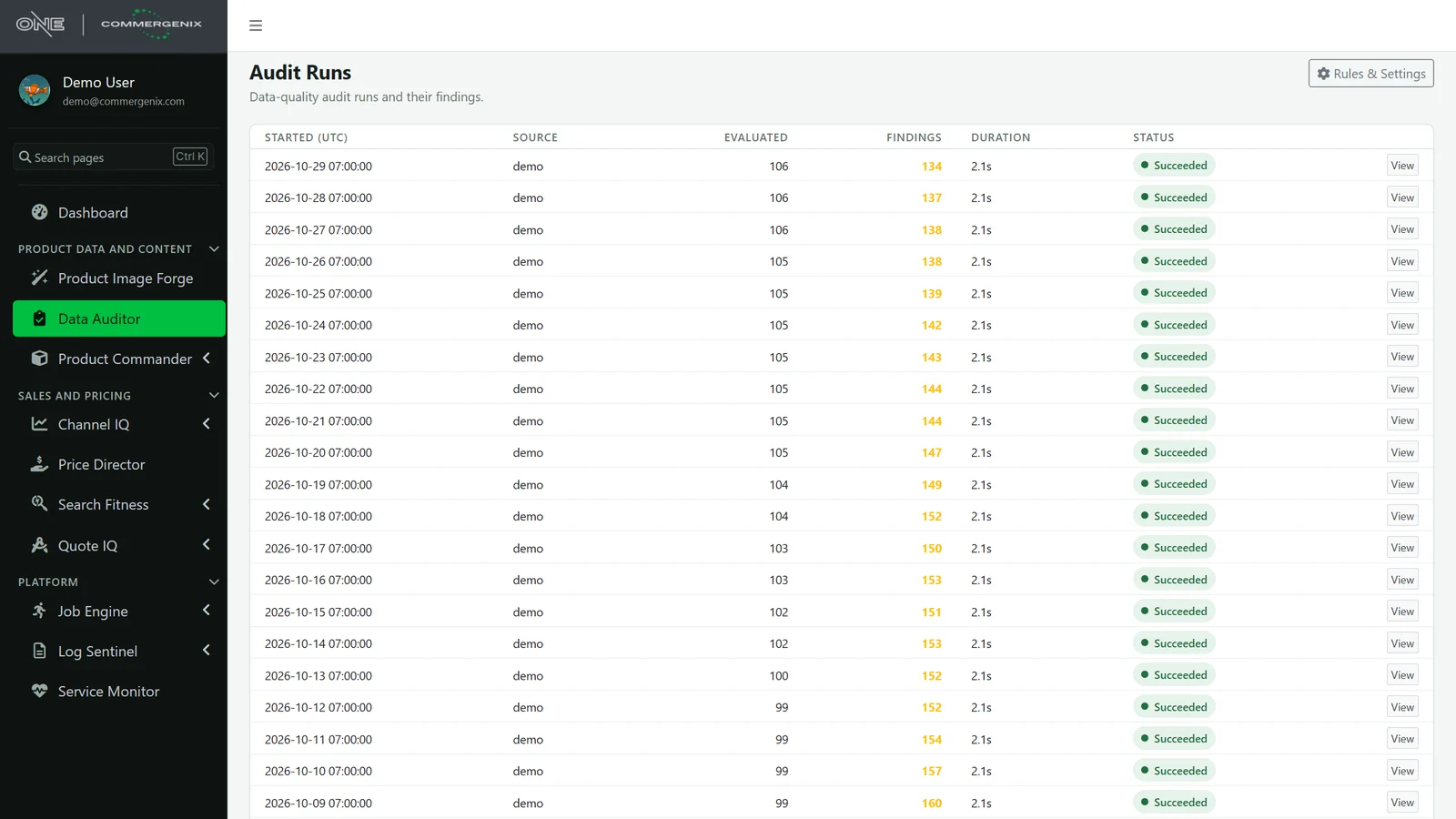
Every run is listed with how many products it checked, how many findings it raised and how long it took. A falling number is your team’s cleanup, measured. A sudden jump points straight at last night’s import.
- Snapshots, not a live view: last Tuesday’s run still shows exactly what was wrong last Tuesday.
- Failed runs are recorded too, with the reason, so a missing audit never goes unnoticed.
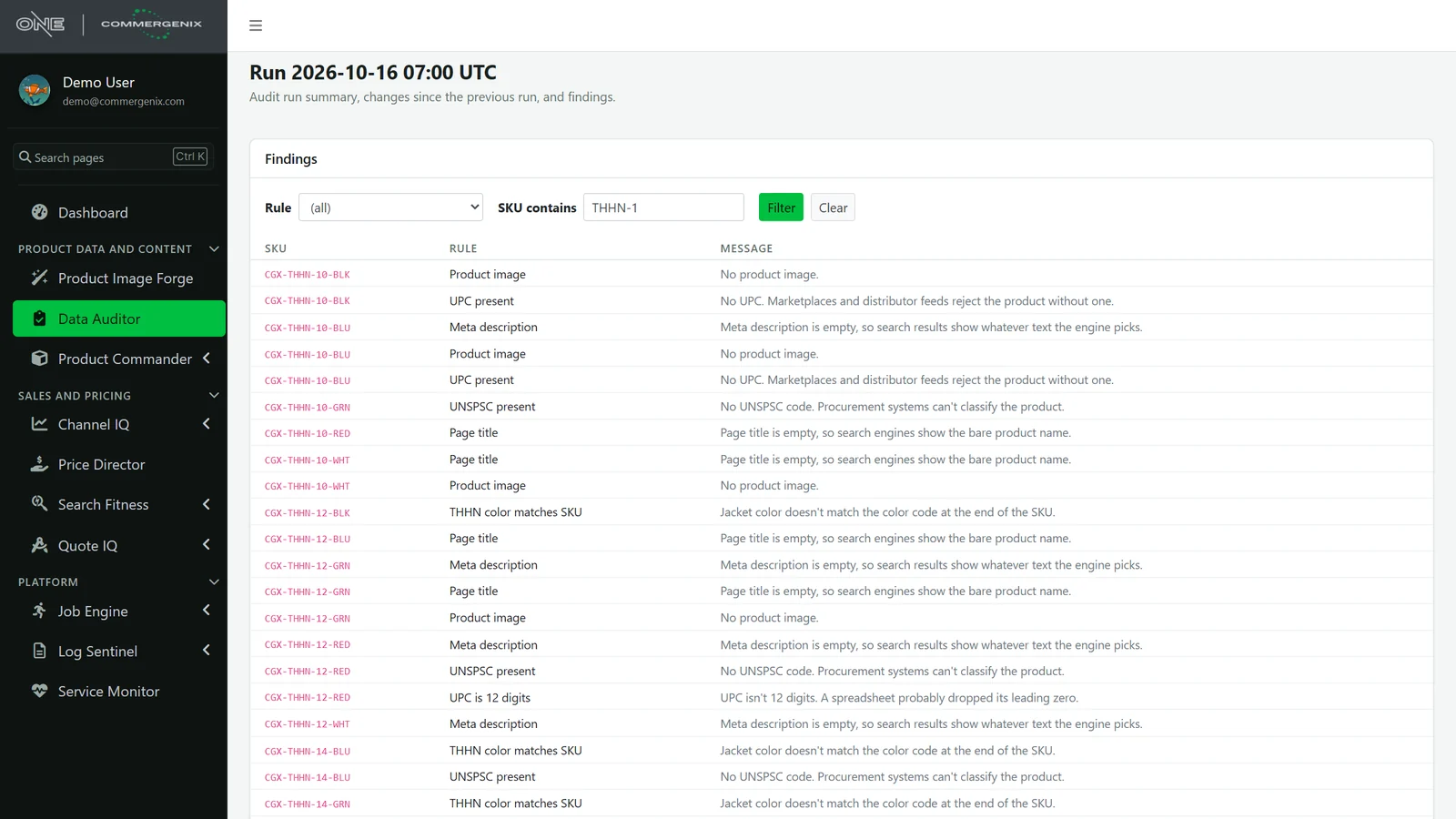
Every finding names the product, the rule and why.
Findings list the SKU, the rule it broke, and a plain-language message written with the rule. Filter to one rule to give a person one kind of fix, or to one product line to clean it up in one pass.
- New, resolved, persisting: the change since the previous run is at the top of every run.
- Rule changes are flagged: if the rules were edited between two runs, the comparison says so, so a new rule isn’t mistaken for new bad data.
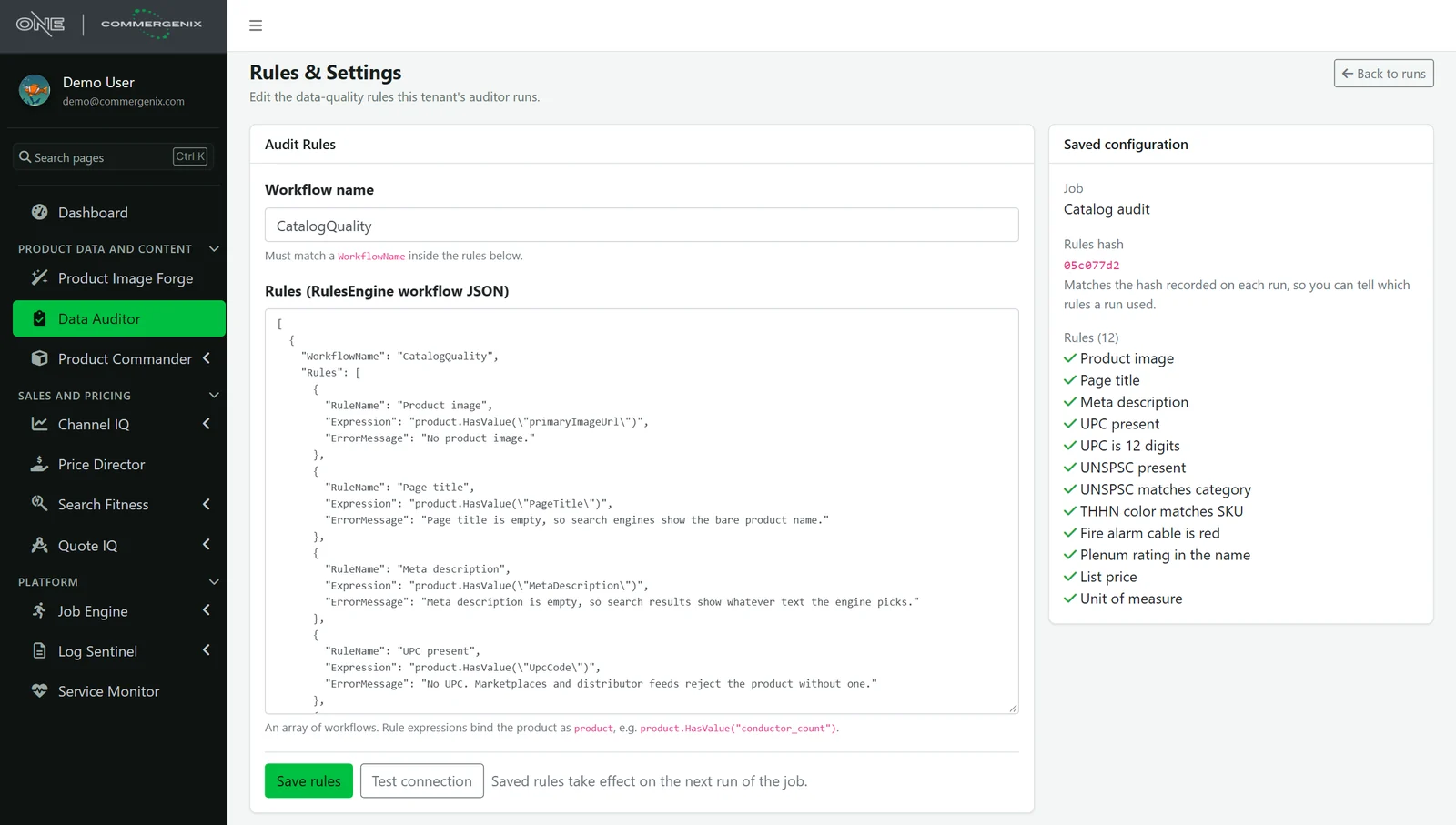
Rules that say what your product experts mean.
Each rule is a short expression, such as product.HasValue("UpcCode"), with a name and a message in plain language. Rules are validated by the same engine that runs them, so a malformed rule is refused when you save it, not discovered at 2 a.m.
- Versioned by fingerprint: each run records a hash of the rules it used, so you always know which rules produced which findings.
- Any field, any logic: required fields, number ranges, code lists, cross-field checks, SKU patterns.
Your part numbers already describe the product. Hold the attributes to them.
Manufacturers build meaning into SKUs: gauge, conductor count, material, stranding class, color. A decoder rule set splits the SKU into those parts and checks each one against the attribute it should agree with.
| Rule | What it checks | Findings |
|---|---|---|
| Gauge uses the AWG option | The gauge attribute uses the “10 AWG” option, not its duplicate without the unit | 228 |
| Strand count matches the decoder | Strand count fits the gauge and stranding class in the decoder table | 96 |
| Stranding class matches SKU | A (K) in the SKU means Class K; none means Class B | 84 |
| Brand name matches stranding class | The description names the flexible product line exactly when the SKU is Class K | 84 |
An auditor that only looks.
The audit reads from your PIM and writes only its own results. It has no way to change a product value.
- A record even when it fails. A run is recorded before it starts. If it fails, the run says Failed with the reason instead of quietly not appearing.
- Honest comparisons. Rules are fingerprinted on every run. When the rules changed between two runs, the comparison warns you.
- Your data stays yours. Runs and findings are kept per company and shown only to that company’s users.
- On the dashboard. The latest finding count and its change since the previous run sit on your home dashboard.
- Any catalog source. Akeneo today, and the same audit engine reads other catalogs. Rules and history stay the same when the source changes.
For teams that answer for product data.
PIM and catalog managers
Know the state of the whole catalog every morning, and prove the cleanup is working.
Product managers and engineers
Turn the rules you check by eye into rules checked on every product, every night.
eCommerce and integration teams
Catch a bad import the morning after, before it syndicates to the website, marketplaces and distributors.
Common questions
Which PIMs does it work with?
Akeneo today. The audit engine is separate from the source, so another catalog needs only a new connector, and your rules and run history carry over.
Does it change my product data?
No. It only reads. Fixes are made in your PIM the way you make them today, and the next run shows them as resolved.
Who writes the rules?
We set up your first rule set with you, usually from the checks your team already does by hand and your SKU decoder. After that, an Admin can edit rules in the browser, and they’re checked before they’re saved.
How often does it run?
On whatever schedule you choose, typically nightly, before the team starts work. A run over a catalog of a few thousand products takes seconds to minutes, depending on the PIM.
What happens when I add a rule?
The next run checks every product against it. Its findings show as new, and the run is marked as having different rules from the one before, so nobody mistakes them for new bad data.
Works alongside
Every Commergenix module shares one sign-in, one job engine, and one set of integrations, so each one you add makes the others more useful.
Product Commander
Shows what’s missing across your catalog, lines up every source of product data, and saves approved values to the system you sell from.
Learn more →Product Sources
Reads manufacturer catalogs and spec sheets for the values your products are missing, each with the page it came from, for a person to approve.
Learn more →Product Image Forge
Produces catalog images in bulk, with wire and cable renders from Layer One’s CableViz Studio.
Learn more →Start with the checks you already do by hand.
Bring the rules your team checks today and your SKU decoder. The first audit shows where your catalog stands, and every run after that shows whether it’s getting better.